AI
Does ChatGPT Save Your Data and Photos? What OpenAI Keeps
Does ChatGPT save your data? Yes: chats stay until you delete them, and uploaded photos stay in Library even after the chat is gone. Training is a setting.

By Mohamed Ezz CEO & Founder May 26, 2025

Does ChatGPT save your data? Yes: OpenAI says your chats "remain saved to your account until you delete them," and deleted chats are scheduled for permanent deletion within 30 days (OpenAI Help Center). Photos and files you upload are saved separately in your Library, and deleting the chat does not delete them, so you have to remove them from Library as well.
Whether any of it trains OpenAI's models depends on one switch, Improve the model for everyone, under Settings > Data Controls. Temporary Chats skip your history and Library and are never used for training, though OpenAI may keep them up to 30 days for safety checks.
After nearly 20 years in AI development and digital marketing, I have read OpenAI's data pages more often than most people read their bank statements. This post lays out what ChatGPT keeps, how long it keeps it, which settings change that, and what the "store data in persistent storage" prompt in Firefox is really asking.
My Main Points:
- ChatGPT saves your chats until you delete them. A deleted chat is scheduled for permanent deletion within 30 days.
- Photos and files you upload live in your Library and survive chat deletion. You delete them there, and they are gone within 30 days.
- Training on your chats and uploads happens only while Improve the model for everyone is on. Turning it off does not delete or hide saved chats.
- Temporary Chat keeps nothing in your history or Library and is never used for training, but OpenAI may hold a copy for up to 30 days.
- Business, Enterprise, Edu and API data are not used for training by default, and API inputs and outputs are kept for up to 30 days.
- The court order from the New York Times case that forced OpenAI to keep deleted consumer chats ended on September 26, 2025.
In this guide, I walk through each of those points with the OpenAI pages that back them, and I point to our ChatGPT Enterprise guide where a work account changes the rules.
Does ChatGPT Save Your Photos?
ChatGPT saves your photos. Every image, document, spreadsheet or presentation you upload in a chat is stored in your Library, a storage area OpenAI keeps separate from the chat itself. Library is available on Free, Go, Plus, Pro, Business, Enterprise, Edu and Healthcare accounts, and images you generate appear in the Images tab.
Deleting the chat leaves the photo in place. OpenAI's wording: "Deleting a chat containing files does not delete those files saved to Library." To remove a photo for good, open Library, select the file and click Delete. If your Library shows a Recently deleted view, the file waits there until you choose Delete forever or the window runs out; either way, OpenAI schedules deleted files for permanent deletion within 30 days.
Library storage is 500 MB on Free, 4 GB on Go, 20 GB on Plus and Business, and 100 GB on Pro, with a 20 MB cap per image. Uploads made in a Temporary Chat "are not saved to your account or Library," so that is the mode for anything you do not want kept. And OpenAI may use uploaded files to improve its models only while Improve the model for everyone is switched on.
Memory is a separate store. If ChatGPT saved a detail from a photo or chat as a memory, deleting the chat does not necessarily delete that memory. You manage memories under Settings > Personalization (Memory FAQ).
What ChatGPT Collects and Stores
ChatGPT collects two kinds of data: the content you give it and the technical data your device sends. OpenAI's privacy policy lists both.
Content You Provide
- Every prompt you type and every response you receive
- Files, images, audio and video you upload
- Data pulled from connected apps such as Google Drive
- Account details: name, contact information, date of birth and payment information
This content stays in your account until you delete it. Once you do, OpenAI says it removes the data from its systems within 30 days, unless it is legally required to keep it longer or the content was already anonymized and separated from your account for model improvement.
Log, Usage and Device Data
Log, usage and device data arrive automatically with every request. The privacy policy names these categories:
| Data type | What OpenAI collects |
|---|---|
| Log data | IP address, browser type and settings, date and time of each request |
| Usage data | Features used, content viewed, time zone, country, device type |
| Device information | Device name, operating system, device identifiers, browser |
| Location | General area from your IP address; precise GPS location only if you choose to share it |
| Cookies | Preferences, authentication and support |
ChatGPT Agent Screenshots
ChatGPT agent mode, which absorbed the older Operator tool, works by taking screenshots of its virtual browser. OpenAI's agent help page says chats, browsing history and screenshots stay in your history until you delete them, and that deleted agent chats and their screenshots are removed within 90 days, three times the window for a normal chat. The same page now says agent mode is being retired in favor of ChatGPT Work, but the retention rule still applies to anything you ran with it. Our ChatGPT Agent guide covers what the tool did.
How Long ChatGPT Keeps Your Data
ChatGPT keeps most data until you act, then clears it within 30 days.
| Data | Kept until | Gone from OpenAI systems |
|---|---|---|
| Regular and archived chats | You delete them, or a workspace policy removes them | Within 30 days of deletion |
| Files and photos in Library | You delete them from Library | Within 30 days |
| Temporary Chats | Not saved to your account | Safety copy kept up to 30 days |
| Saved memories | You delete them | Within 30 days |
| Your account | You delete it | Within 30 days |
| ChatGPT agent chats and screenshots | You delete the chat | Within 90 days |
| API inputs and outputs | 30 days by default; zero data retention available | After 30 days |
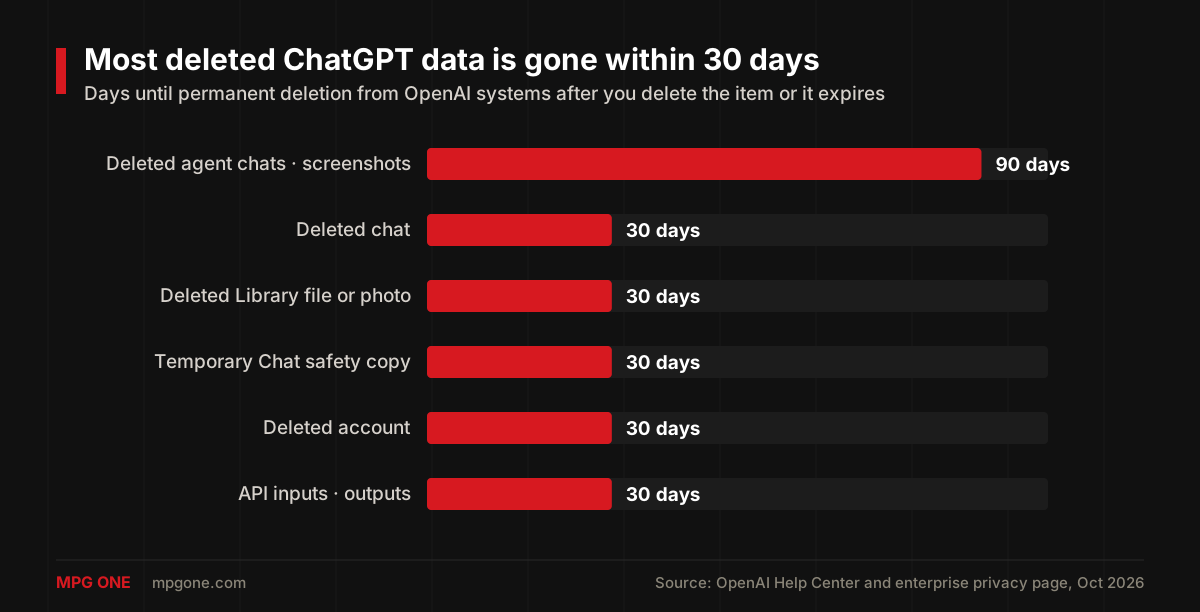
One exception ran through most of 2025. A preservation order in the New York Times copyright lawsuit required OpenAI to hold consumer ChatGPT and API data that would normally have been deleted. OpenAI says its "obligations under the earlier order ended on September 26, 2025," and only a limited set of data from April to September 2025 remains under legal hold, locked to a small legal and security team (OpenAI). Enterprise and Edu workspaces and zero data retention API customers were never covered by the order.
ChatGPT Data Retention by Plan
ChatGPT's retention rules depend on the plan. Personal accounts keep chats until you delete them and may use them for training; workspace and API accounts do not train by default and hand retention control to admins.
Free, Go, Plus and Pro Accounts
Free, Go, Plus and Pro accounts all get the same answer to "does ChatGPT save your data": yes, every chat, upload and memory stays until you delete it, and the Improve the model for everyone setting decides whether OpenAI can train on that content. Deleted chats and files clear within 30 days. A saved chat has no automatic expiry, so the cleanup is on you.
Temporary Chat
Temporary Chat is the closest thing ChatGPT has to an incognito mode. A Temporary Chat does not appear in your history, does not save uploads to Library, and is not used to improve OpenAI's models. OpenAI may keep a copy for up to 30 days for safety purposes. You turn it on per conversation, and you cannot come back to it later unless you save it, which turns it into a regular chat with regular retention.
Business, Enterprise and Edu Workspaces
Business, Enterprise, Edu, Healthcare and Teachers workspaces are not used for training by default, according to OpenAI's enterprise privacy page. Workspace admins control how long data is retained, deleted conversations leave OpenAI's systems within 30 days, and Enterprise and Edu admins can pull an audit log of conversations through the Compliance API. Self service account deletion is not available in these workspaces; your organization handles it.
API Data
API inputs and outputs are kept for up to 30 days to provide the service and detect abuse, then removed, and OpenAI does not train on them by default. Eligible endpoints can request zero data retention, in which case prompts and responses are never logged. If you build on the ChatGPT API, that 30 day window is the number to put in your own privacy policy.
ChatGPT Privacy Settings and Data Controls
ChatGPT gives you four controls that matter: the training switch, Temporary Chat, memory settings, and deletion.
Turn Off Improve the Model for Everyone
Improve the model for everyone is the training switch. When it is off, your new chats, uploads and agent screenshots are not used to train OpenAI's models. OpenAI says plainly that turning it off "does not delete or hide saved chats," and retention periods stay the same. The switch decides what the data may be used for.
- Click your profile icon and open Settings
- Select Data Controls
- Switch off Improve the model for everyone
The switch covers new conversations. Past chats stay saved, and content OpenAI already anonymized for model improvement is not pulled back, so turn it off before the sensitive conversation.
Delete Chats, Files, Memories or Your Account
Deletion in ChatGPT is spread across five places, and every one of them clears from OpenAI's systems within 30 days.
| What you delete | Where | Gone from OpenAI systems |
|---|---|---|
| A single chat | Chat menu, Delete | Within 30 days |
| All chats | Settings > Data Controls | Within 30 days |
| A file or photo | Library, Delete (then Delete forever in Recently deleted) | Within 30 days |
| A memory | Settings > Personalization | Within 30 days |
| Your account | Settings > Account, Delete account | Within 30 days |
Account deletion is permanent. You do it from Settings > Account, or through the Privacy Portal (Make a Privacy Request, then Delete my ChatGPT account) if you cannot sign in. OpenAI deletes your data within 30 days, except for a limited set it must keep by law, and you can reuse the same email for a new account after 30 days (account deletion page).
Workspace Admin Controls
Workspace admins in Enterprise, Edu and Healthcare get the controls individuals do not: retention periods for the workspace, SAML SSO, role based feature access, and the Compliance API for exporting or deleting conversations and Library files. OpenAI states that its employees access workspace conversations only to resolve incidents, to recover a user's chats with explicit permission, or where the law requires it. Our ChatGPT Enterprise guide covers the admin side in detail.
Allow chatgpt.com to Store Data in Persistent Storage: What It Means
"Allow chatgpt.com to store data in persistent storage" is a Firefox permission prompt, and it has nothing to do with what OpenAI keeps on its servers. It decides whether Firefox may keep chatgpt.com's local site data, things like cached files and saved settings, on your own device until you clear it.
Websites can ask a browser for persistent storage through a standard web API. According to MDN, "In Firefox, when a site chooses to use persistent storage, the user is notified with a UI popup," while Safari, Chrome and Edge approve or deny the request automatically based on how often you use the site and show no prompt. That is why only Firefox users see this question.
- Allow: Firefox keeps chatgpt.com's local data until you delete it in your browser settings.
- Block: the data stays in "best effort" mode, which means Firefox may clear it when the device runs low on space. ChatGPT still works.
Either way, your chats, photos and memories remain on OpenAI's servers under the retention rules above, and your training setting is unchanged. On your own computer, allowing it is fine. On a shared or public computer, block it, or clear site data for chatgpt.com when you finish.
ChatGPT Privacy Risks for Individuals and Businesses
ChatGPT's privacy risks come from four places: training on personal accounts, human review, disclosure to third parties, and legal holds.
Training on Personal Accounts
Training on personal accounts is the biggest risk. With the switch on, OpenAI may use your prompts and uploads to improve its models, and content it has already anonymized for that purpose is not removed when you delete the chat. That is the strongest reason to turn the switch off before you paste anything sensitive, and to use a workspace or the API for company data, where training is off by default.
Claude's personal plans work the same way. On Free, Pro and Max, Anthropic can train on your chats unless you switch off "Help Improve our AI models", and we cover whether Anthropic trains on your Claude data plan by plan.
Human Review
Human review is limited but real. OpenAI says a limited number of authorized personnel, plus service providers bound by confidentiality, can access content to investigate abuse or security incidents, handle support requests, deal with legal matters, or improve the model if you have not opted out, and that all access is logged (OpenAI). For workspaces the list is shorter: incident response, recovering a user's chats with explicit permission, or legal requirements.
Disclosure to Third Parties
OpenAI's privacy policy says it discloses personal data to vendors and service providers (hosting, cloud, analytics, payments, safety), to affiliates, to government authorities when legally required, to business account administrators, and to a successor in a merger, sale or bankruptcy. It also states that it does not sell personal data or share it for targeted advertising. Your employer's workspace admin can read your work account chats; that is by design.
Legal Holds
Legal holds can override every deletion window above. The New York Times lawsuit showed it: a court order kept deleted consumer chats and API logs alive for months in 2025, until it ended on September 26, 2025. A subpoena or regulatory order can do the same again, which is why OpenAI's 30 day promise always carries the phrase "unless legally required."
What Regulators and Companies Have Done
Regulators have tested OpenAI's practices with mixed results. Italy's data protection authority, which briefly blocked ChatGPT in 2023, fined OpenAI 15 million euros in December 2024 after an investigation into its handling of personal data (Reuters). In March 2026 the Court of Rome annulled that fine (Reuters). The court did not explain its ruling at the time.
Companies acted earlier. Samsung banned ChatGPT and similar tools on company devices in May 2023 after staff uploaded internal source code to it (The Verge, citing Bloomberg). Whether that code ever reached a training set is unknown, and it did not matter: pasting it into an outside service was the incident.
How to Keep Your ChatGPT Data Private
Keeping your ChatGPT data private takes five settings and one habit. This is the routine I give clients before they roll ChatGPT out to a team.
- Turn off Improve the model for everyone in Settings > Data Controls on every personal account. Do it before the sensitive chat, since the switch only covers new conversations.
- Use Temporary Chat for health, legal, financial and HR questions. Nothing lands in history or Library, and OpenAI clears its safety copy within 30 days.
- Clean Library as well as chats. Deleting a chat leaves photos and files in Library; open it monthly and delete what you no longer need.
- Review memories under Settings > Personalization. A deleted chat does not necessarily delete the memory it created.
- Move company data to a workspace or the API. Business, Enterprise, Edu and API data are not used for training by default, and admins control retention.
One habit covers the rest: decide where a conversation belongs before you start it. If it would embarrass you or your employer on a server you do not control, use Temporary Chat or keep it out of ChatGPT altogether.
FAQ
Does ChatGPT save your photos?
Yes. ChatGPT saves every photo and file you upload to your Library, and OpenAI's help center says deleting the chat does not delete the file. Delete it from Library as well, and it is removed from OpenAI's systems within 30 days.
Does ChatGPT keep deleted chats?
ChatGPT removes a deleted chat from your account at once, and OpenAI schedules it for permanent deletion within 30 days unless it must keep it for legal or security reasons. A deleted chat cannot be restored.
Should I allow chatgpt.com to store data in persistent storage?
On your own computer, allowing it is fine. The prompt comes from Firefox and lets the browser keep chatgpt.com's local site data until you clear it. It changes nothing about what OpenAI keeps on its servers. On a shared computer, block it or clear site data afterward.
Does ChatGPT use my chats for training?
ChatGPT uses chats and uploads from Free, Go, Plus and Pro accounts for training only while Improve the model for everyone is on in Settings > Data Controls. Turning it off does not delete saved chats. Business, Enterprise, Edu and API data are not used for training by default.
Does Temporary Chat save anything?
Temporary Chat does not add the conversation to your history or Library and is not used for training, but OpenAI may keep a copy for up to 30 days for safety checks.
Final Thoughts
So, does ChatGPT save your data? Yes, until you delete it. It also keeps photos in a Library that outlives the chat, and it trains on personal accounts only while one switch is on. Deleted data clears within 30 days, agent screenshots take up to 90, and a legal hold can stretch any of it.
If your company wants an assistant without sending customer data to a shared consumer account, that is the work we do: private assistants and internal AI systems that keep data where you decide. See our custom AI solutions to start the conversation.
Helpful next steps
Turn the idea into something useful
When this topic becomes part of a real website, workflow, campaign, or AI system, these MPG ONE pages are the natural places to continue.
Build private AI assistants, workflow automation, knowledge systems, and reporting layers.
Generative AI development servicesBuild generative AI workflows for content, documents, knowledge, and brand-safe operations.
AI agent development servicesDesign tool-using AI agents with memory, retrieval, permissions, and human review.
Custom AI solutionsCreate a custom AI system around your data, tools, permissions, and operating model.
MPG ONE coursesLearn practical AI systems, SEO growth workflows, and talent brand operations with MPG ONE training.