AI
How to Create an AI Agent (No Code, Low Code or Python)
How to create an AI agent in 6 steps: no code, low code or Python paths, a working example, and why over 40% of agent projects fail. Start small.

By Mohamed Ezz CEO & Founder Feb 6, 2025
Here is how to create an AI agent in one sentence: pick one small, repetitive task, choose a build path (a no code builder like Microsoft Copilot, a workflow tool like n8n, or code with an agent SDK), give the agent a model, one or two tools and clear instructions, then test it on real examples before you let it act on its own.
That is the whole method, and the rest of this guide shows how to create an AI agent step by step. After nearly 20 years in digital marketing and AI development, the pattern I see most is people starting too big: Gartner predicts that over 40% of agentic AI projects will be canceled by the end of 2027, according to its June 2025 forecast.
My Main Points:
- An AI agent is a model plus tools plus instructions that completes a task on its own, which is how OpenAI defines it.
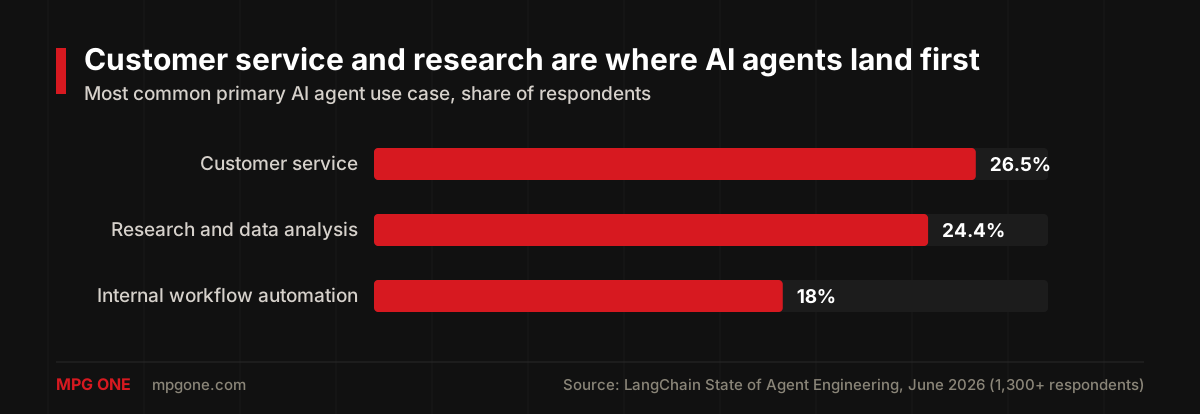
- Start with one small task. Customer service (26.5%) and research (24.4%) are the most common first agent jobs, according to LangChain's 2026 survey.
- You can build an agent three ways: no code (Copilot, Zapier Agents), low code (n8n, OpenAI Agent Builder) or code (OpenAI Agents SDK, Claude Agent SDK, LangGraph).
- Use one agent with one or two tools before you try multiple agents. OpenAI and Anthropic both recommend starting simple.
- Test on real examples and require human approval for risky actions. Quality is the top barrier to production for 32% of teams.
In this guide you'll get the 6 steps, a comparison of the three build paths, a worked example in both no code and Python, and the free courses worth your time.
What an AI agent is, in plain English
An AI agent is software that uses an AI model to complete a task on your behalf, deciding its own next steps along the way. OpenAI's practical guide to building agents defines agents as systems that independently accomplish tasks on your behalf.
Every AI agent has three parts, per that same guide:
- A model: the AI that reasons and decides what to do next.
- Tools: functions or app connections the agent uses to act, like reading your inbox or updating a spreadsheet.
- Instructions: clear rules and limits that define how the agent behaves.
An AI agent differs from a chatbot because it acts instead of only answering. It also differs from a classic automation because it handles judgment calls instead of following fixed rules.
That last point tells you when you don't need an agent. OpenAI suggests agents for work that involves complex decisions, rules too messy to maintain, or lots of unstructured text like emails and documents. If your task is a fixed "when X happens, do Y", a simple automation is cheaper and more reliable.
How to pick your first AI agent project
The best first AI agent project is a small, repetitive task you already do every week, where a mistake is easy to spot and cheap to fix. Real teams start in the same places: customer service is the most common primary agent use case (26.5% of respondents), followed by research and data analysis (24.4%) and internal workflow automation (18%), according to LangChain's State of Agent Engineering survey of more than 1,300 professionals, published June 2026.
Good first AI agent projects for beginners:
- Weekly status report: the agent reads your notes, tasks or messages and drafts a five bullet update.
- Inbox triage: the agent labels incoming emails and drafts replies for the routine ones, which you approve.
- FAQ answers from your documents: the agent answers common customer questions using only your help pages.
- Research brief: the agent collects sources on a topic and summarizes them with links you can check.
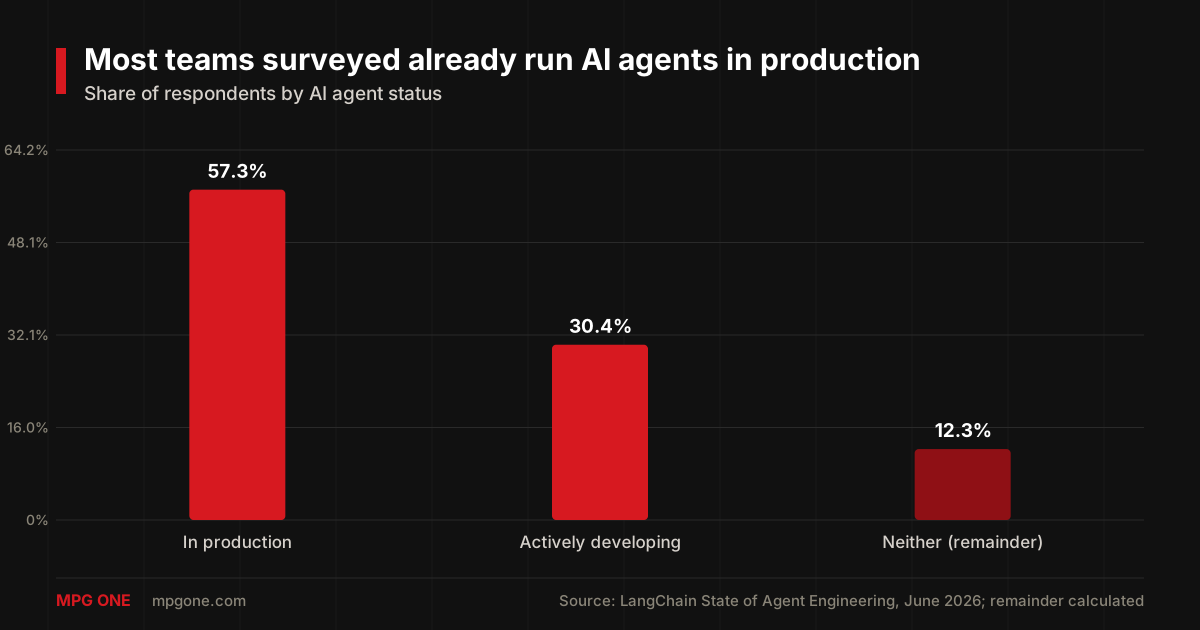
Agents are not a fringe experiment anymore. In the same LangChain survey, 57.3% of respondents already run agents in production and another 30.4% are actively developing them, which leaves 12.3% doing neither.
Why start small anyway? Gartner expects over 40% of agentic AI projects to be canceled by the end of 2027 because of escalating costs, unclear business value or weak risk controls. A small agent with one clear job avoids all three.
How to create an AI agent in 6 steps
Creating an AI agent comes down to six steps, and they are the same whether you use a no code builder or write Python.
- Define the job and how you'll measure it. Write one sentence: "Every Friday, draft my weekly report from my task list." Then decide what good looks like, such as "I edit fewer than two lines."
- Pick your build path. No code, low code or code, compared in the next section. Choose the simplest one that can reach your data.
- Choose a model. Start with a capable general model from the tool's default list. You can switch to a cheaper model once the agent works.
- Connect one or two tools. Give the agent only the access it needs, like read access to your task app. The Model Context Protocol (MCP) is becoming the standard way to plug tools into agents.
- Write clear instructions. State the goal, the steps, the output format and what the agent must never do. Structured prompts help a lot here; our JSON prompting guide shows how to make instructions the model follows reliably.
- Test on 20 real examples, then add guardrails. Run last month's real cases through the agent and check every answer. Require your approval before any action that sends, pays or deletes something.
Notice what is missing: memory, multiple agents and fancy frameworks. Add memory only when the agent needs to remember past runs; our guide to building AI agents with memory covers that step when you get there.
Three ways to build an AI agent: no code, low code and code
You can build an AI agent with a no code builder, a low code workflow tool, or code using an agent SDK. The right choice depends on where your data lives and how much control you need.
| Build path | Best for | Example tools | What you need |
|---|---|---|---|
| No code builder | Your first agent, office and admin tasks | Microsoft Copilot agents, Zapier Agents | A clear task description |
| Low code workflow | Agents that act across several apps | n8n AI Agent node, OpenAI Agent Builder | Comfort with workflows and app connections |
| Code with an SDK | Custom agents inside your own product | OpenAI Agents SDK, Claude Agent SDK, LangGraph | Basic Python or TypeScript |
No code: Microsoft Copilot and Zapier Agents
No code AI agent builders let you describe the job in plain English and connect your apps, with no programming at all. Microsoft's own guide to building an agent in Copilot walks through the flow: start with the problem, build the agent, add knowledge, then test and share it. Zapier Agents works the same way and connects to more than 8,000 apps.
Low code: n8n and OpenAI Agent Builder
Low code AI agent tools give you a visual canvas where you connect steps yourself, which means more control without writing much code. In n8n, the AI Agent node connects a chat model and one or more tools, and the agent decides which tools to call. OpenAI's Agent Builder is a visual canvas for multi step agent workflows, with templates and drag and drop nodes.
Code: OpenAI Agents SDK, Claude Agent SDK and LangGraph
Coding an AI agent with an SDK gives you full control and is the path for agents that live inside your own product. The OpenAI Agents SDK is the quickest start in Python.
Anthropic's Claude Agent SDK gives you the same tools, agent loop and context management that power Claude Code, in Python and TypeScript; if you already use Claude Code, our Claude Code guide is a good primer. LangGraph suits agents whose steps you want to map out and control precisely.
Your first AI agent: a worked example
Here is how to create an AI agent for a real job, a weekly report writer, built two ways so you can see how little changes between paths.
The no code version
In a no code builder like Microsoft Copilot or Zapier Agents, the weekly report agent takes about four inputs:
- Name: Weekly report agent.
- Instructions: "Every Friday, read my tasks and notes from this week. Write a five bullet report: done, in progress, blocked, next week, and one risk. Keep each bullet under 20 words. Never send anything; save it as a draft."
- Knowledge or tools: connect your task app or notes folder with read only access.
- Test: run it on the last three weeks and compare each draft with what you actually sent.
The Python version
The same weekly report agent in Python takes about 20 lines with the OpenAI Agents SDK. Install it with pip install openai-agents and set your OPENAI_API_KEY, per the official quickstart.
import asyncio
from agents import Agent, Runner
from agents.decorators import tool

@tool
def get_this_weeks_tasks() -> str:
    """Return this week's finished and open tasks."""
    return "Done: launch page, client call. Open: invoice Acme, fix contact form."

agent = Agent(
    name="Weekly report agent",
    instructions="Write a five bullet weekly report from the task list. Flag anything still open.",
    tools=[get_this_weeks_tasks],
)

async def main():
    result = await Runner.run(agent, "Write my weekly report.")
    print(result.final_output)

asyncio.run(main())
In a real agent, the tool function would call your task app's API instead of returning fixed text. That connection is exactly the job MCP standardizes, so you can reuse the same tool across different agents.
Common beginner mistakes when building AI agents
The most common beginner AI agent mistake is building too much too soon. These five cause most failed first agents:
- Multiple agents on day one. OpenAI recommends getting the most out of a single agent first, and Anthropic's Building Effective Agents advises finding the simplest solution possible and only increasing complexity when needed.
- Too many tools. Every extra tool is another wrong choice the agent can make. Start with one or two.
- No testing on real cases. Quality is the top barrier to production for 32% of teams, with latency second at 20%, in LangChain's survey.
- No human approval for risky actions. OpenAI's guide says to plan for human intervention when the agent fails repeatedly or attempts a high risk action.
- Buying "agents" that aren't. Gartner warns about agent washing and estimates only about 130 of the thousands of agentic AI vendors are real.
How to learn AI agent development for free
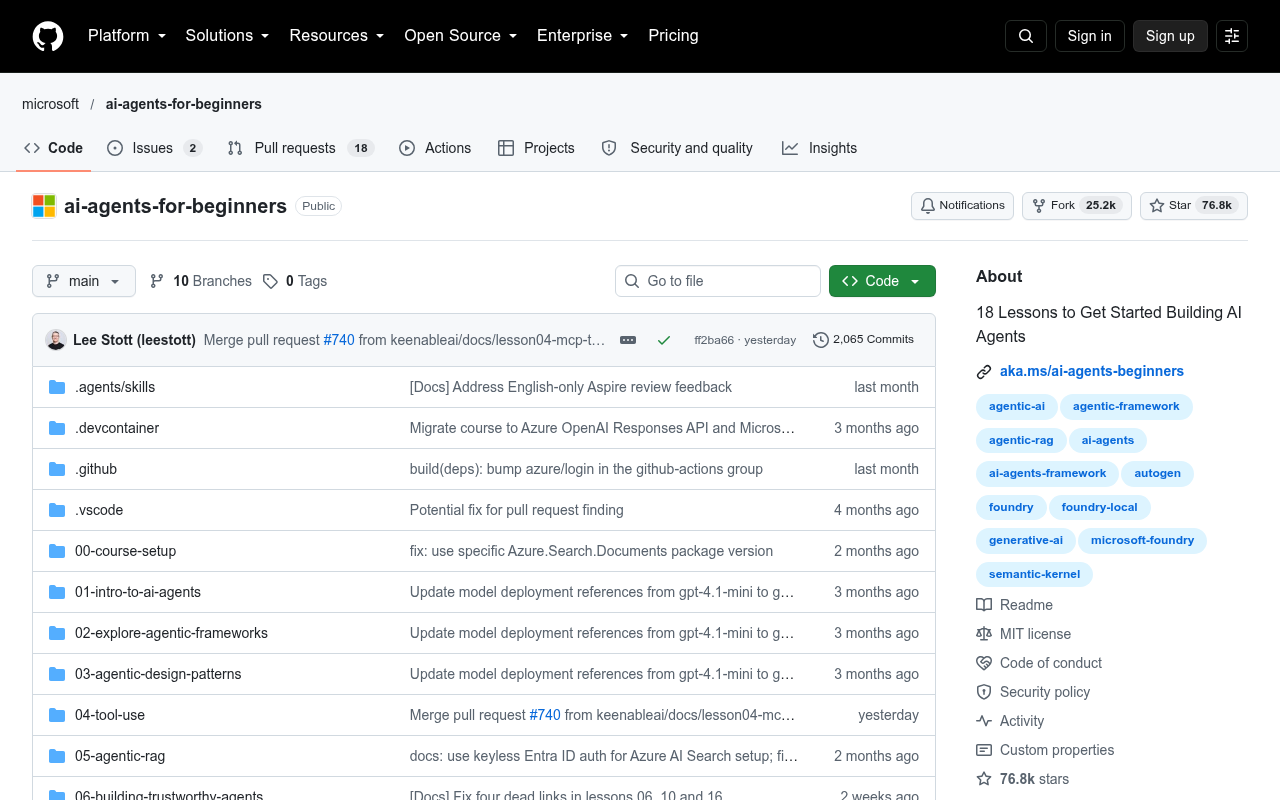
The best free way to learn AI agent development is Microsoft's AI Agents for Beginners course on GitHub, which has 18 lessons and more than 76,000 stars as of October 2026. It uses Microsoft's own Azure stack, so pair it with vendor neutral reading.
Three more free resources worth your time:
- OpenAI's practical guide to building agents for design basics: models, tools, instructions and guardrails.
- Anthropic's Building Effective Agents for when to use a simple workflow instead of an agent.
- Our MCP and JSON prompting guides for connecting tools and writing instructions agents follow.
When to stop building your AI agent yourself
Build your first AI agent yourself, but get help once the agent touches customer data, money, internal systems or compliance rules. Those are the projects where Gartner's three failure reasons (costs, unclear value and weak risk controls) hit hardest.
Signs you've outgrown the do it yourself stage:
- The agent needs access to your CRM, ERP or databases, not just your own inbox.
- A wrong action would cost real money or hurt a customer.
- Several teams depend on it, so it needs monitoring, logs and an owner.
Before you talk to anyone, read our breakdown of AI agent development cost so you know what a fair quote looks like.
FAQ
What is the easiest way to create an AI agent?
The easiest way to create an AI agent is a no code builder such as Microsoft Copilot's agent builder or Zapier Agents, where you describe the job in plain English and connect your apps. Start with one small task, like a weekly status report.
Can I create an AI agent without coding?
Yes. No code builders like Zapier Agents, which connects to more than 8,000 apps, and Microsoft Copilot let you create an AI agent by writing instructions and connecting tools. You only need code when the agent must live inside your own product.
How long does it take to build an AI agent?
A simple no code AI agent can be working in an afternoon, and Zapier says you can create a custom agent in minutes. A reliable agent for real work usually takes weeks of testing, because quality is the top barrier to production for 32% of teams in LangChain's 2026 survey.
How much does it cost to build an AI agent?
Building a simple AI agent yourself can cost little more than a tool subscription plus model usage. When an agency builds it, AI agent development cost runs from about $10,000 for a simple bot to more than $400,000 for a multi agent system.
Do I need more than one AI agent?
Usually not. OpenAI recommends getting the most out of a single agent first, because more agents add complexity. Split the work into several agents only when one agent keeps choosing the wrong tools or its instructions become too complex.
Final thoughts
Learning how to create an AI agent is mostly about restraint: one task, one agent, one or two tools, clear instructions and real testing. Get that first agent working on something small, and the bigger projects become far less risky.
When you're ready for an agent that connects to your business systems and runs safely at scale, our AI agent development services team builds exactly that.
Helpful next steps
Turn the idea into something useful
When this topic becomes part of a real website, workflow, campaign, or AI system, these MPG ONE pages are the natural places to continue.
Design tool-using AI agents with memory, retrieval, permissions, and human review.
Generative AI development servicesBuild generative AI workflows for content, documents, knowledge, and brand-safe operations.
AI development servicesBuild private AI assistants, workflow automation, knowledge systems, and reporting layers.
MPG ONE coursesLearn practical AI systems, SEO growth workflows, and talent brand operations with MPG ONE training.
Custom AI solutionsCreate a custom AI system around your data, tools, permissions, and operating model.