Marketing & SEO
Cloudflare Block AI Bots: What Replaced It and What to Pick
Cloudflare block AI bots is deprecated. Since Sept 15, 2026, blocking Training also stops Googlebot. Here is what to pick, plus an AI crawler list.

By Mohamed Ezz CEO & Founder Oct 25, 2026

Cloudflare Block AI bots, the single switch many sites used to stop AI crawlers, was retired on September 15, 2026 and replaced by three controls for Search, Training and Agent bots. Choosing Block for Training now also stops Googlebot, Bingbot and Applebot, according to Cloudflare's announcement, so the option that refuses AI training and keeps you in Google is the new Disallow AI Training setting.
After nearly 20 years in digital marketing, I treat any setting that can block Googlebot as a priority check, and this one now can. Below is what changed, what to pick for your kind of site, a reference list of AI crawlers, and the test I ran on mpgone.com, which runs on Cloudflare.
My Main Points:
- Cloudflare deprecated Block AI bots on September 15, 2026 and replaced it with separate Search, Training and Agent controls in Security Settings, available on every plan.
- Setting Training to Block now blocks Googlebot, Bingbot and Applebot too, which can take you out of search. Disallow AI Training refuses training and keeps search.
- If you had the old switch on, Cloudflare moved you to Disallow AI Training and started blocking AI agents on pages that show ads.
- Fewer than 1% of Cloudflare sites block search bots, while 17% block AI training in some way, per Cloudflare.
- The share of AI bot requests refused with a 403 on Cloudflare rose from 5.98% to 13.47% in a year, per an analysis of Cloudflare Radar data.
In this guide, I'll show you the new settings, the robots.txt rules that match them, and how to check that your site still lets in the crawlers that bring you visibility in tools like Google's AI Overviews.
Cloudflare Block AI Bots: What Changed on September 15, 2026
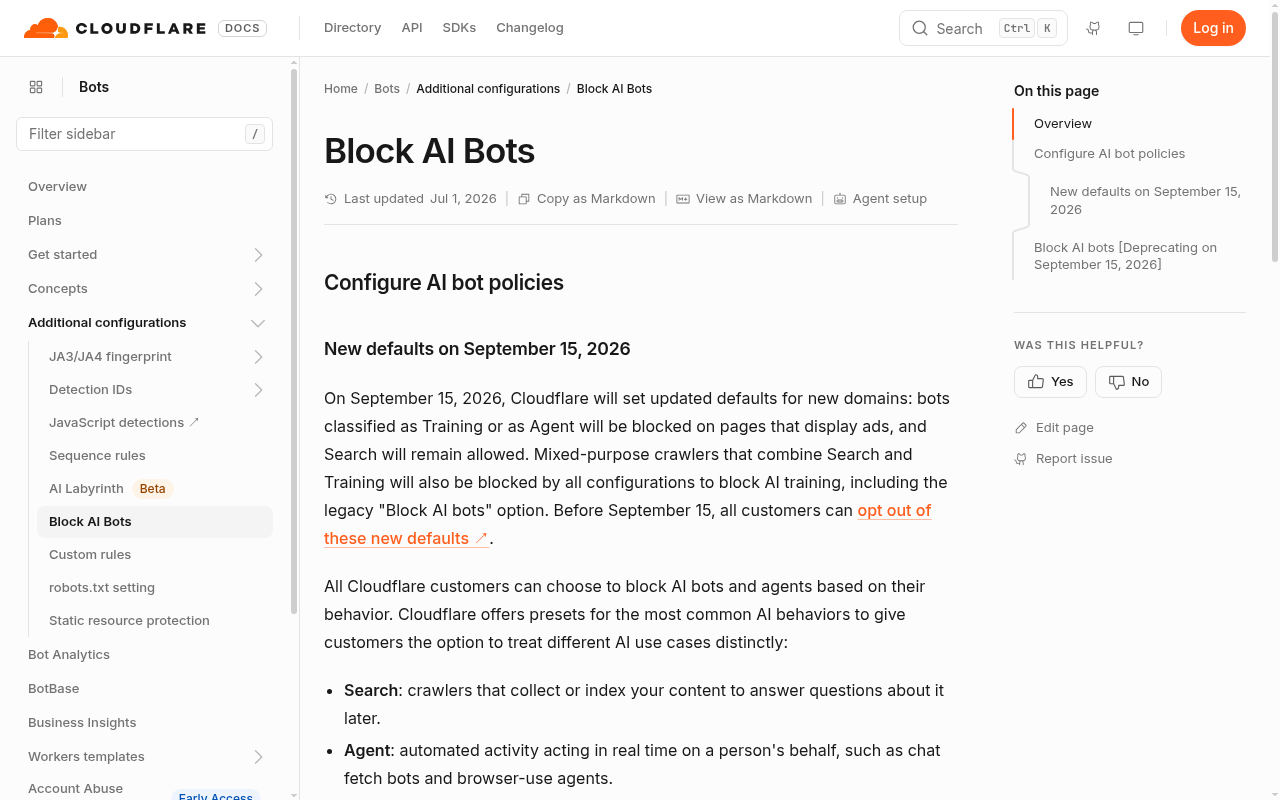
Cloudflare split AI bots into three behaviors on September 15, 2026 and gave each its own control. Search bots crawl to build a search index, Training bots crawl to train or fine tune a model, and Agent bots visit a page on behalf of a person, such as the fetchers behind AI chat apps.
Training now has four options, while Search and Agent have three:
| Setting | What it does | Available for |
|---|---|---|
| Allow | All crawlers in that category get in, unless another setting or a WAF rule blocks them | Search, Training, Agent |
| Disallow AI Training | Publishes a no training rule in robots.txt; Googlebot, Bingbot and Applebot stay allowed for search, and every other training crawler is blocked | Training only |
| Block on pages with ads | Blocks the category only on pages Cloudflare detects as serving ads, including Googlebot and other mixed use crawlers for Training | Search, Training, Agent |
| Block | Blocks the whole category on every page, including Googlebot, Bingbot and Applebot for Training | Search, Training, Agent |
The Block option changed the most. Googlebot, Bingbot and Applebot are mixed use crawlers: one bot collects pages for both search and AI training. Before September 15, Block on Training skipped them to protect search. Now it includes them, and Cloudflare says to pick Block only if you want those crawlers gone entirely, search included.
Two other features changed with it. The managed robots.txt option was deprecated in favor of Bot Preference Sync, which writes your AI bot settings into your robots.txt automatically, and new domains now start from one of two presets depending on whether the site earns money from ads.
How Cloudflare Migrated Your Old Block AI Bots Setting
Cloudflare moved every existing domain to the new controls on its own, and the result depends on what you had before. Here is the migration for domains that only used the old Block AI bots switch:
| Old Block AI bots setting | New Search | New Training | New Agent |
|---|---|---|---|
| Off (not enabled) | Allow | Allow | Allow |
| Block | Allow | Disallow AI Training | Block on pages with ads |
| Block on pages with ads | Allow | Disallow AI Training | Block on pages with ads |
Sites that switched on the old Block AI bots to stop training now also block AI agents on every page that shows an ad. Those agents are the fetchers that open a page when someone asks an AI assistant a question, so an ad supported site can lose citations in AI answers without anyone touching a setting.
Domains that had already set the newer controls kept their practical effect: an old Training value of Block or Block on pages with ads became Disallow AI Training, and Search and Agent stayed as they were. Cloudflare's own answer to what you need to do is "Nothing, in almost every case," but only you can tell whether the migrated values still match your goals.
Which Cloudflare AI Bot Setting Should You Pick?
The right Cloudflare AI bot setting depends on how your site makes money. Cloudflare's data shows most sites already agree on search: fewer than 1% block search bots, while 17% enable some way to block training.
- Lead generation and service businesses: Allow Search, Allow Agent, and either Allow Training or pick Disallow AI Training if you object to it. You want to be cited when buyers ask AI assistants for a provider, and refusing training costs you little because the search crawlers stay in.
- Publishers that earn from ads: Cloudflare's preset is Search Allow, Training set to Disallow AI Training, and Agent set to Block on pages with ads. That protects ad views, but it also stops AI assistants from opening those pages, so watch your AI referrals after you set it.
- Online stores: Allow all three. Cloudflare's own example is a store that wants its products to surface when a shopper asks a chatbot for a recommendation.
Whatever you pick, avoid Block on Training unless you are ready to leave Google, Bing and Apple search. At MPG ONE we allow everything, because being found in AI answers is part of what we sell, and our robots.txt says so.
AI Crawlers List: Which Bots Search, Train or Fetch for Users
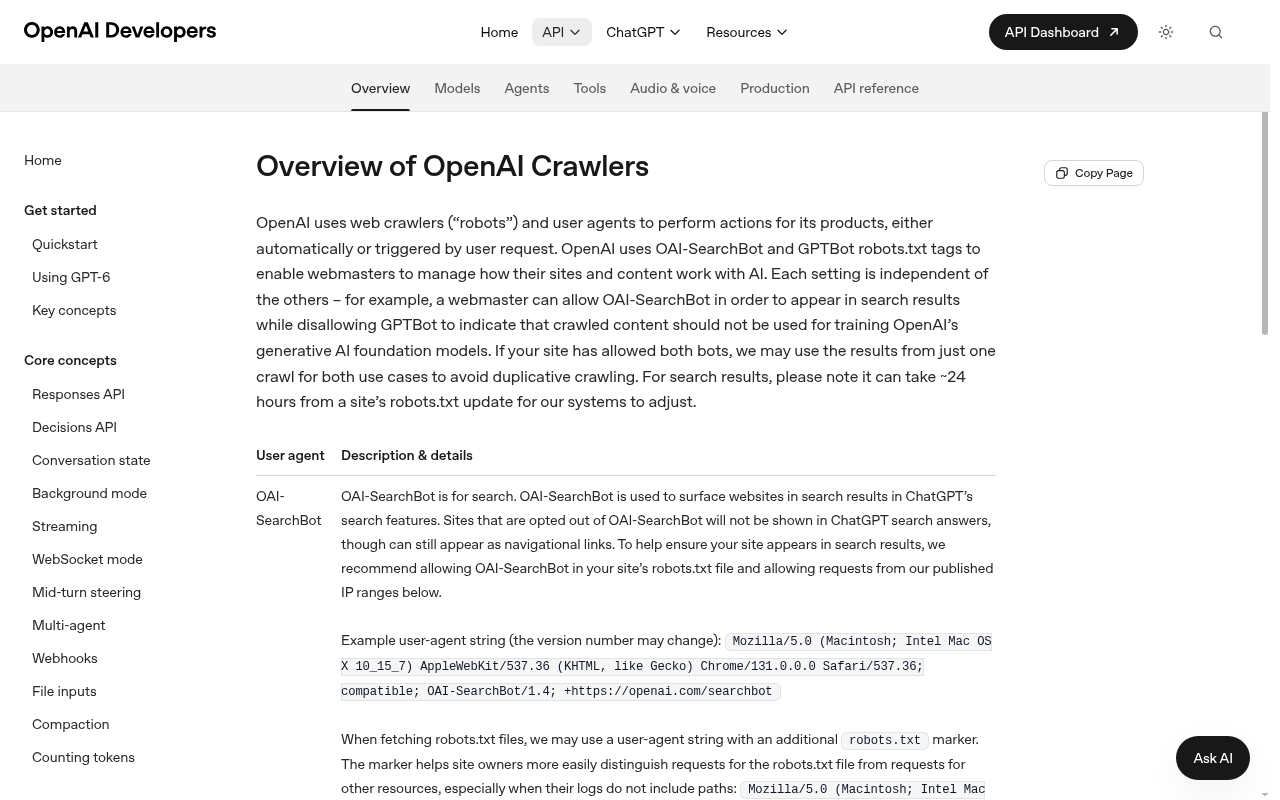
AI companies run separate crawlers for search, training and user requests, and the robots.txt name you block decides which of those you lose. This list comes from each company's own crawler documentation, checked on October 25, 2026, with the training role for CCBot and Bytespider taken from Cloudflare Radar's classification.
| Company | Crawler name in robots.txt | Job | What blocking it costs you |
|---|---|---|---|
| OpenAI | GPTBot | Training | Nothing in ChatGPT search; OpenAI says its bots are independent |
| OpenAI | OAI-SearchBot | Search | Your pages in ChatGPT search answers |
| OpenAI | ChatGPT-User | User requests (robots.txt "may not apply") | Pages ChatGPT opens when a user asks |
| Anthropic | ClaudeBot | Training | Nothing in Claude search |
| Anthropic | Claude-SearchBot | Search | Visibility in Claude's search results |
| Anthropic | Claude-User | User requests | Pages Claude retrieves for a user's question |
| Perplexity | PerplexityBot | Search (not used for training) | Your pages in Perplexity results |
| Perplexity | Perplexity-User | User requests (generally ignores robots.txt) | Pages Perplexity opens to answer a user |
| Googlebot | Search and training | Google Search | |
| Google-Extended (a token, not a separate crawler) | Gemini training and grounding | Gemini answers drawing on your pages; no effect on Google Search | |
| Apple | Applebot | Search and training | Apple's search features |
| Apple | Applebot-Extended | Training opt out | Nothing in Apple search |
| Microsoft | Bingbot | Search and training | Bing search; use the NOARCHIVE tag to refuse training instead |
| Meta | meta-externalagent | Training and indexing | Use in Meta's AI training and product indexing |
| Meta | Meta-ExternalFetcher | User requests (may bypass robots.txt) | Links Meta's AI opens for users |
| Common Crawl | CCBot | Training datasets | Inclusion in Common Crawl |
| ByteDance | Bytespider | Training | Use in ByteDance's AI training |
The sources: OpenAI's crawler overview, Anthropic's crawler page, Perplexity's crawler docs, Apple's Applebot page and Meta's web crawlers page. Google-Extended works the same way for Gemini as I explained in does Gemini train on your data.
Bing is the exception for robots.txt training rules. Microsoft is still building support for a no training preference in robots.txt, targeted for early 2027, so until then Cloudflare says Disallow AI Training does not pass a no training preference to Bing, and the NOARCHIVE meta tag is the way to refuse it.
Robots.txt for AI Crawlers: A Copy Ready Template
Robots.txt for AI crawlers only needs rules for the bots you want to keep out, since everything not disallowed is allowed. This template refuses the main training crawlers and leaves search and user fetchers alone:
# Training crawlers: no
User-agent: GPTBot
User-agent: ClaudeBot
User-agent: Google-Extended
User-agent: Applebot-Extended
User-agent: meta-externalagent
User-agent: CCBot
User-agent: Bytespider
Disallow: /

# Everyone else, including search and user fetchers
User-agent: *
Content-Signal: search=yes, ai-input=yes, ai-train=no
Allow: /

Sitemap: https://example.com/sitemap.xml
The Content-Signal line comes from Cloudflare's Content Signals Policy: search covers search results, ai-input covers feeding your pages to AI for live answers, and ai-train covers training or fine tuning. Blocking Google-Extended also stops Gemini from grounding answers on your pages, so drop that line if Gemini visibility matters to you.
You don't need Allow lines for each AI bot you are not blocking. In an r/SEO thread from October 2026, an agency SEO asked whether clients' AI written audits were right to demand an Allow line for every AI crawler, and the replies agreed that listing bots already allowed changes nothing. User fetchers such as ChatGPT-User and Perplexity-User may ignore robots.txt because a person asked for the page, and robots.txt is only a request: enforcement happens at the edge, in Cloudflare's AI bot settings or a firewall rule.
Who Gets Blocked: AI Crawler Data From Cloudflare Radar
AI crawler blocking more than doubled in a year. An analysis of Cloudflare Radar data by TechnologyChecker.io, pulled on October 1, 2026, found that 13.47% of AI bot requests got a 403 Forbidden in Q3 2026, up from 5.98% in Q3 2025.
Training bots take most of the blocking. In Cloudflare Radar's September 28, 2026 snapshot of 4,242 robots.txt files, Bytespider was named under Disallow 3.83 times for every Allow, CCBot 2.61, meta-externalagent 2.55, GPTBot 1.60, ClaudeBot 1.58 and Google-Extended 1.38. Search bots sat near one to one: Googlebot 1.11, PerplexityBot 1.07, bingbot 0.99 and OAI-SearchBot 0.91.
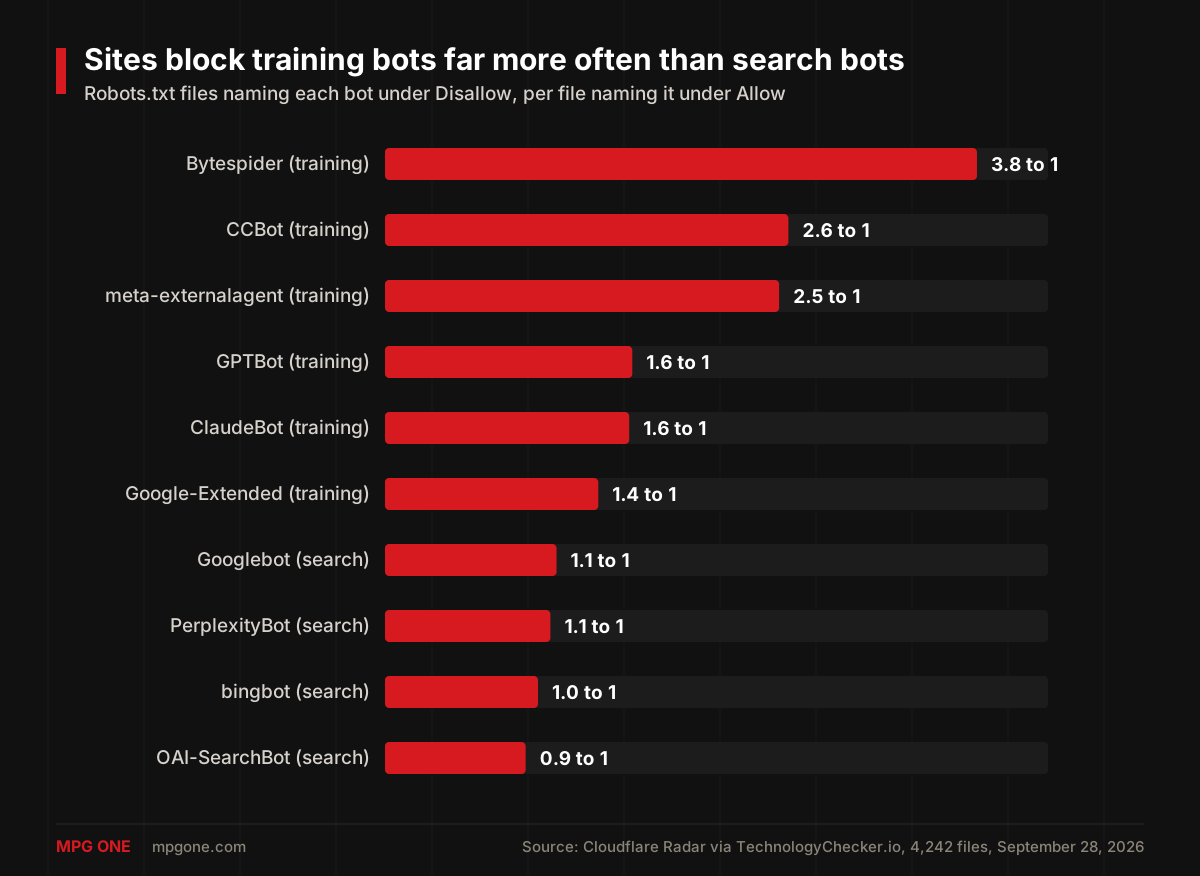
TechnologyChecker treats the September file counts as provisional because the sample of files changed that month, so read the ratios as a rough direction.
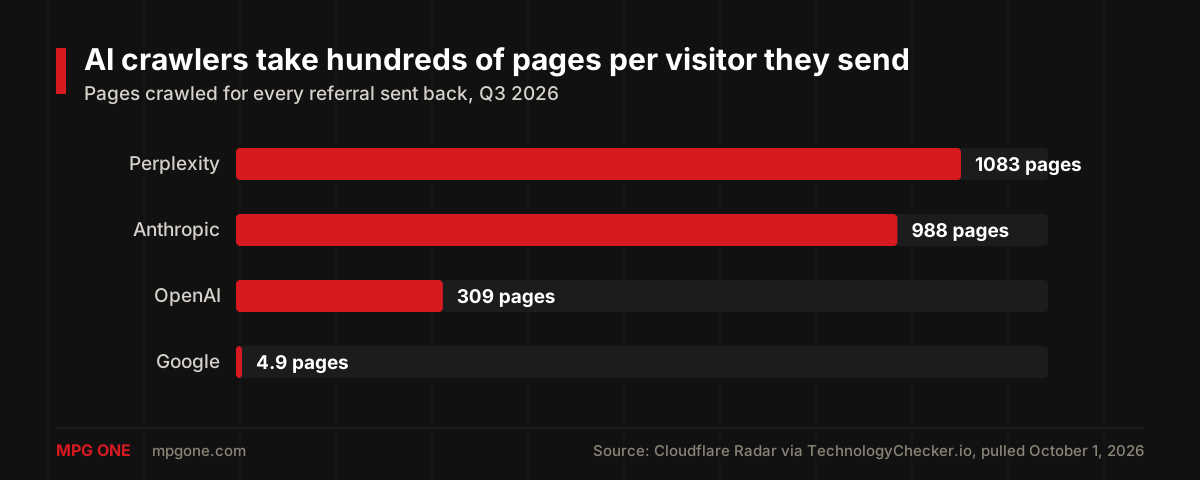
The crawl to referral numbers show how little some AI crawlers send back. In Q3 2026, Perplexity crawled 1,083 pages for every visitor it sent back, Anthropic 988 and OpenAI 309, while Google crawled 4.9 pages per referral.
How to Check Your Site: Our mpgone.com Test
Checking your own site takes about ten minutes, and I ran the same steps on mpgone.com on October 25, 2026:
- In the Cloudflare dashboard, open your domain's Security Settings and find the AI bot policies for Search, Training and Agent. If Training says Block, you are blocking Googlebot; change it, then follow our guide to getting Google to crawl your website again.
- Open yourdomain.com/robots.txt. With Bot Preference Sync on, Cloudflare adds a section that starts with "# BEGIN Cloudflare Bot Preference Sync" above your own rules.
- Request a page while posing as a crawler and look for 403 errors:
curl -s -o /dev/null -w "%{http_code}" -A "GPTBot/1.3" https://yourdomain.com/- Open AI Crawl Control in the dashboard to see which AI crawlers actually visit and what they get back.
On mpgone.com, our live robots.txt matched the file in our code exactly, with no Cloudflare section added, and it allows every crawler:
User-agent: *
Allow: /

Content-Signal: search=yes, ai-train=yes, ai-input=yes

Sitemap: https://mpgone.com/sitemap-index.xml
I then requested our newest post with 14 crawler user agents: GPTBot, OAI-SearchBot, ChatGPT-User, ClaudeBot, Claude-SearchBot, Claude-User, PerplexityBot, Perplexity-User, Googlebot, Bingbot, Applebot, CCBot, Bytespider and meta-externalagent. All 14 got a 200 response.
Cloudflare identifies bots by more than the name they claim, so a faked user agent from my laptop is not treated like a real GPTBot visit, and a clean result only proves that no rule blocks those names. The AI Crawl Control dashboard is where you see what real crawlers receive.
FAQ
Does Cloudflare block AI bots by default?
Not for most sites. Since September 15, 2026, new domains that don't run ads start with Search, Training and Agent all set to Allow, while new domains that earn from ads start with Disallow AI Training and agents blocked on pages with ads. Existing domains kept the effect of their old choice.
Does blocking AI training on Cloudflare block Googlebot?
Yes, if you pick Block. Since September 15, 2026, Block and Block on pages with ads apply to crawlers that do both search and training, including Googlebot, Bingbot and Applebot. Pick Disallow AI Training to refuse training and stay in Google search.
What does Block AI bots not enabled mean on Cloudflare?
It means the legacy Block AI bots switch was off on your domain. Cloudflare deprecated that switch on September 15, 2026, and domains where it was off were migrated to Allow for Search, Training and Agent.
Is Cloudflare AI Crawl Control free?
Yes. Cloudflare's docs say AI Crawl Control is available on all plans, and the Search, Training and Agent controls work on every plan as well. Pay per crawl, which lets you charge crawlers for access, is still in private beta.
Should I block GPTBot?
Only if you object to OpenAI training on your content. OpenAI says GPTBot and OAI-SearchBot are independent, so blocking GPTBot does not remove you from ChatGPT search, while blocking OAI-SearchBot does.
Final Thoughts
Cloudflare block AI bots is gone, and the replacement gives you finer control with one new way to hurt yourself: Block on Training now stops Googlebot. For most business sites, the safe setup is Search and Agent on Allow, Training on Allow or Disallow AI Training, and a robots.txt that says the same thing.
Check your migrated settings this week, then watch whether AI tools actually cite you; our PageCue tool tracks your AI search visibility. If you want a second pair of eyes on your crawl settings and AI visibility, that is part of our marketing and SEO services.
Helpful next steps
Turn the idea into something useful
When this topic becomes part of a real website, workflow, campaign, or AI system, these MPG ONE pages are the natural places to continue.
Connect technical SEO, content strategy, campaigns, analytics, and conversion-focused pages.
MPG ONE coursesLearn practical AI systems, SEO growth workflows, and talent brand operations with MPG ONE training.
AI development servicesBuild private AI assistants, workflow automation, knowledge systems, and reporting layers.
AI agent development servicesDesign tool-using AI agents with memory, retrieval, permissions, and human review.
Generative AI development servicesBuild generative AI workflows for content, documents, knowledge, and brand-safe operations.