AI
Does Gemini Train on Your Data? The Answer for Every Plan
Does Gemini train on your data? Yes on personal accounts with Keep Activity on, and reviewed chats stay 3 years. No on Workspace or paid API. See why.

By Mohamed Ezz CEO & Founder Oct 25, 2026
Does Gemini train on your data? Yes, if you use Gemini on a personal Google account with Keep Activity on, which is the default: Google's Gemini Apps Privacy Hub, updated October 23, 2026, says it uses that activity to improve its services "including training generative AI models," and chats picked for human review are kept for up to 3 years. No, if you use Gemini through a Google Workspace business or education account, the paid Gemini API or Google Cloud, where Google's terms say your prompts are not used to train its models.
To stop training on a personal account, turn off Keep Activity in Gemini Apps Activity, or open a Temporary Chat for one sensitive conversation. Turning it off costs you your chat history, and Gemini still keeps new chats for 72 hours.
After nearly 20 years in AI development and digital marketing, I've read more AI privacy policies than I'd like to admit. Google's is the hardest to follow because the answer is spread across five separate help pages, so I've put the rules for each Gemini product in one place, with the retention numbers and the settings to change.
My Main Points:
- Personal Gemini, free or paid, can train on your chats while Keep Activity is on. Keep Activity is on by default, and chats auto delete after 18 months unless you change it.
- Chats picked for human review are disconnected from your account and kept for up to 3 years, even after you delete your Gemini history.
- Turning Keep Activity off stops training on future chats, but you lose your chat history and connected apps such as Google Workspace.
- Google Workspace business and education accounts are not used for training or human review without your organization's permission.
- The free Gemini API tier, including Google AI Studio, can be used for training everywhere except the EEA, Switzerland and the UK. The paid tier is not.
- Gemini CLI follows your login: a personal Google login or a free API key can train Google's models, while Code Assist Standard or Enterprise, a paid API key and Vertex AI do not.
In this guide, I'll show you the rule for every Gemini product, what Google still keeps after you opt out, and how Gemini compares with ChatGPT, Claude and Grok, the same way I broke down whether Anthropic trains on your data.
Does Gemini Train on Your Data? The Answer by Gemini Product
Gemini runs under four rulebooks: the Gemini Apps privacy notice for personal accounts, the Workspace terms for work and school accounts, the Gemini API terms for developers, and the Google Cloud terms for Vertex AI. Which one applies depends on how you sign in; the Gemini model you pick doesn't change it.
| Gemini product | Used for training by default? | How long Google keeps chats | Where you control it |
|---|---|---|---|
| Gemini app on a personal account (free and paid Google AI plans) | Yes, while Keep Activity is on | 18 months by default (or 3, 36 or no auto delete); reviewed chats up to 3 years | Gemini Apps Activity: Keep Activity |
| Gemini Temporary Chat, or any chat with Keep Activity off | No, unless you send feedback | 72 hours | Temporary chat button, or Keep Activity off |
| Gemini on a Workspace business or education account | No, without your organization's permission | Set by admins (Gemini app: up to 36 months, 18 by default) | Google Admin console |
| Gemini API free tier and Google AI Studio | Yes, except in the EEA, Switzerland and the UK | Not stated in Google's terms | Add a Cloud Billing account to move to paid |
| Gemini API paid tier | No | Logged for a limited period, for abuse checks only | Cloud Billing account on the project |
| Vertex AI and Gemini for Google Cloud | No | Under the Cloud Data Processing Addendum | Google Cloud console |
| Gemini CLI | Yes on a personal Google login or free API key; no on paid and enterprise logins | Follows the terms of your login | Usage Statistics setting |
I checked every row against Google's pages on October 25, 2026. Google revises them often (the Gemini privacy notice changed on October 13 and the hub on October 23, 2026), so check the linked source before you rely on a single cell for a compliance decision.
Personal Gemini App: Trained While Keep Activity Is On
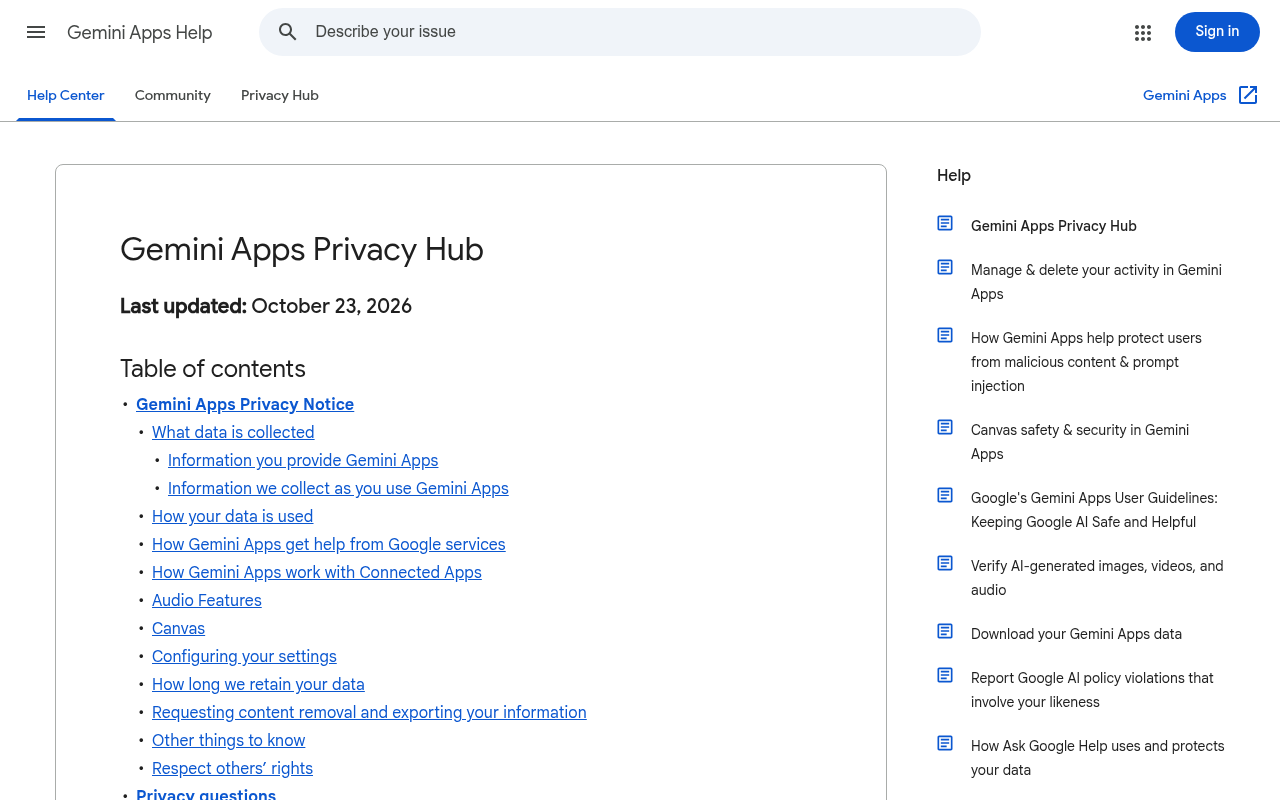
The personal Gemini app trains on your chats whenever Keep Activity is on. Google's privacy hub says it uses your activity "to provide, develop, and improve its services (including training generative AI models)," and a subset of chats is read by human reviewers, including staff at Google's service providers, who rate answers and suggest better ones.
A paid plan follows the same switch, since the privacy hub has no separate training rule for Google AI subscribers. Uploads count too: a photo you share from Google Photos, or chats you import from another AI platform, can be used to improve Google's services while Keep Activity is on.
Some Gemini features stay out of training. Gemini Live audio, video and screenshares are only used if you turn on a separate setting, Notebook source files are not used directly for training, and Google doesn't train on the transcripts of calls Gemini makes for you on Pixel phones.
Google Workspace and Education: Not Trained Without Permission
Gemini on a Google Workspace business, education or public sector account does not train Google's models. The Generative AI in Google Workspace Privacy Hub, updated October 6, 2026, says Workspace "does not use customer data for training models without customer's prior permission or instruction," and that your content is not human reviewed or used for model training outside your domain without permission.
Admins set retention. In the Gemini app they can keep chats for 3, 18 or 36 months, with 18 as the default, and the Gemini side panel in Gmail and Docs can keep conversations from 90 days to indefinitely. Feedback your team sends with a thumbs up or down is kept for up to 18 months and is not used to train the models behind Workspace AI.
Personal Gmail and Drive get a narrower promise. Google told Ars Technica in April 2026 that "when using Gemini in Workspace we do not use that personal content to train our foundational generative AI models," but Ars noted that Gemini's answers can contain summaries of your emails and files, and those chats can still be used for training while Keep Activity is on.
Gemini API and AI Studio: Free Tier Trains, Paid Tier Does Not
The Gemini API trains on free tier traffic and not on paid traffic. Google's Gemini API Additional Terms of Service, effective March 23, 2026, say that on unpaid services, including Google AI Studio and the free quota, Google uses your prompts and responses "to provide, improve, and develop Google products and services and machine learning technologies," and human reviewers may read and annotate them after they are disconnected from your account, API key and Cloud project.
On paid services, Google says it "doesn't use your prompts" or responses to improve its products, and it logs them for a limited period only to catch Prohibited Use Policy violations and meet legal disclosure duties. AI Studio counts as paid when your account has an active Cloud Billing account or is a Workspace enterprise account, and in the EEA, Switzerland and the UK the paid rules cover every tier, free ones included.
Grounding with Google Search is the exception on both tiers: it stores your prompts and outputs for 30 days to build the grounded answer, and Google may use that copy for debugging and testing.
Gemini CLI: It Depends on How You Log In
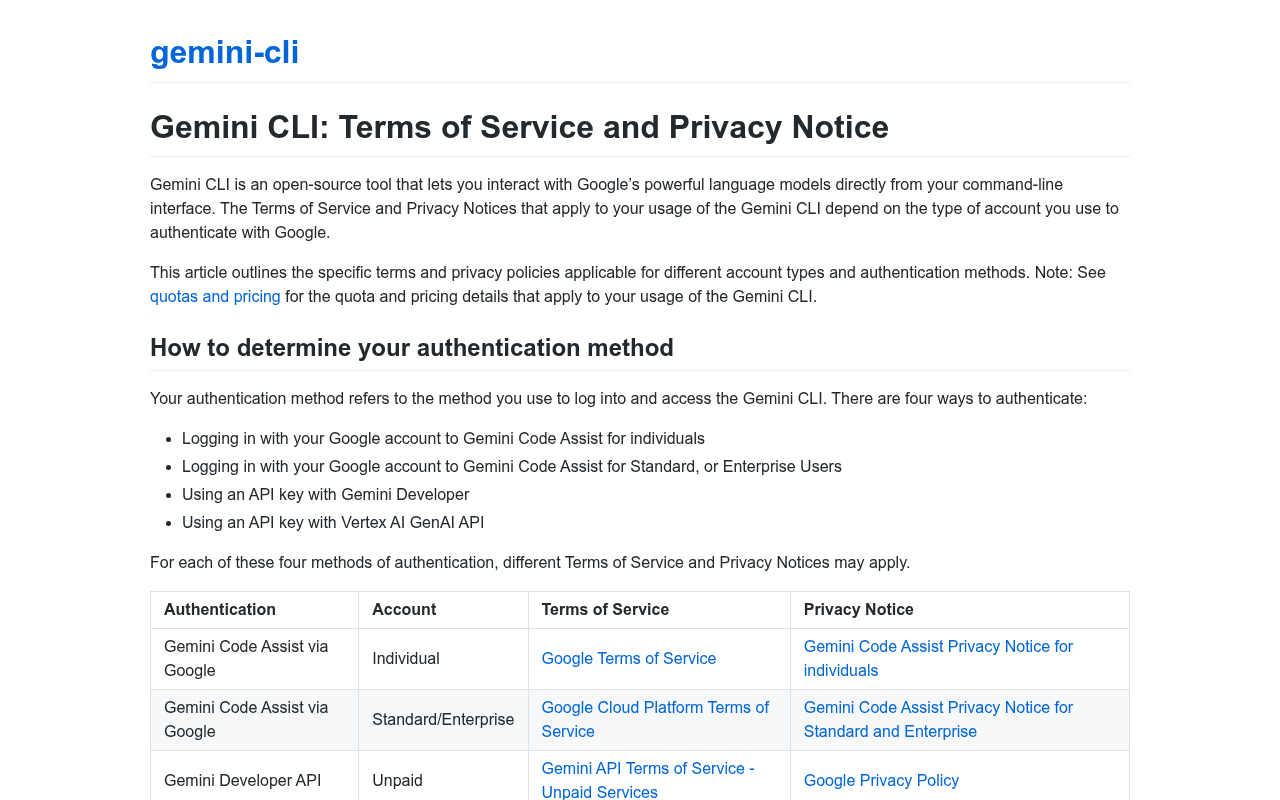
Gemini CLI has four login methods, and two of them can train Google's models. Google's Gemini CLI privacy page says that with a personal Google login (Gemini Code Assist for individuals) or a free Gemini API key, your "prompts, answers, and related code are collected" and may be used for model training. With Code Assist Standard or Enterprise, a paid API key or Vertex AI, they are not collected.
Usage Statistics is the CLI's single control for optional data collection. On a personal Google login, turning it off stops Google collecting your prompts and code for model improvement; on paid and enterprise logins it only controls anonymous telemetry. My Gemini CLI guide covers setup and the login options.
How Long Google Keeps Your Gemini Chats
Google keeps personal Gemini chats for 18 months by default, and you can change that to 3 months, 36 months or no auto delete in Gemini Apps Activity. With Keep Activity off, or in a Temporary Chat, Google keeps new chats with your account for 72 hours. Chats that human reviewers have seen are kept for up to 3 years, disconnected from your account, and deleting your activity does not remove them.
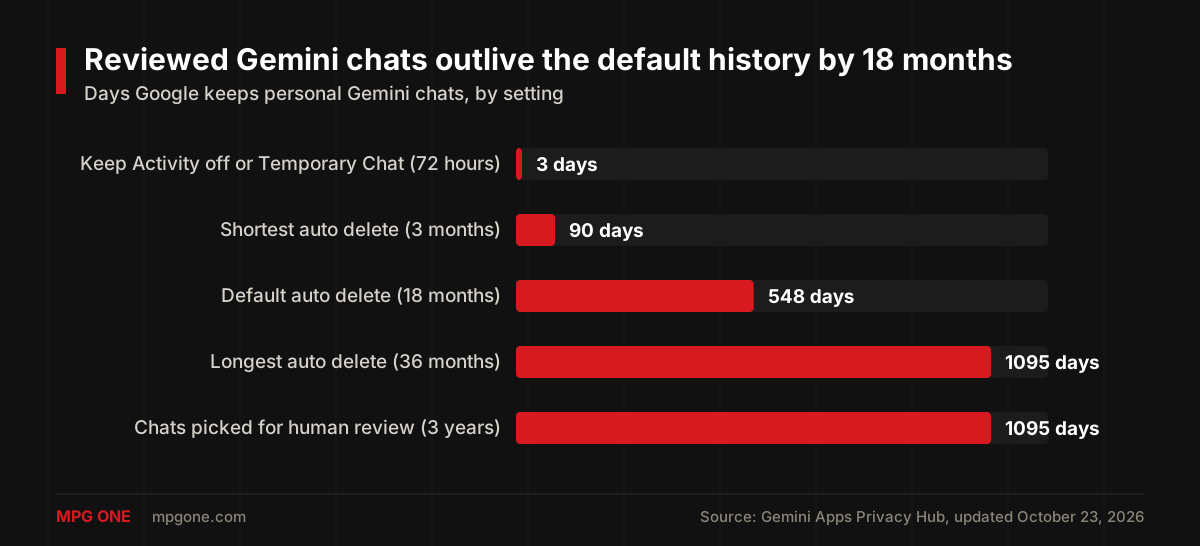
Deleting a chat removes it from your history, but if a reviewer already picked it, Google keeps that copy for up to 3 years. Reviewed feedback and its conversation follow the same 3 year limit.
What Gemini Still Uses After You Turn Off Keep Activity
Turning off Keep Activity stops Gemini from training on your future chats. Google's privacy hub lists what it still keeps and uses afterwards:
- Every new chat stays with your account for 72 hours so Google can answer you, process feedback and protect against abuse, with help from human reviewers.
- A thumbs up or thumbs down sends your feedback, the last 24 hours of your chats and any uploads or connected app content in them to Google, which can use it to improve Gemini and keeps it for up to 3 years.
- Chats a reviewer saw before you opted out stay for up to 3 years.
- Your Gemini settings "don't control processing of your chats to create anonymized data to improve Google services."
- Search Services History, Web and App Activity and Timeline have their own settings and keep saving data until you change them.
Temporary Chat is the cleanest option inside Gemini: Google says temporary chats "are not used to train Google's AI models," and it keeps them with your account for only 72 hours.
How to Stop Gemini From Using Your Data for Training
To stop Gemini from using your data for training on a personal account:
- Open Gemini Apps Activity, or in the Gemini app open Settings and help, then Activity.
- Turn off Keep Activity. You can turn it off alone or turn it off and delete your existing Gemini activity.
- On the same page, check that the setting for audio, Gemini Live videos and screenshares is off. It is off by default.
- Skip the thumbs up and thumbs down buttons on anything sensitive, since feedback can be used even with Keep Activity off.
If you want to keep your history, leave Keep Activity on and use a Temporary Chat for sensitive questions. Developers fix it with billing: a Gemini API project with an active Cloud Billing account moves to the paid terms, and on Gemini CLI you either log in with a paid or enterprise method or turn off Usage Statistics on a personal login.
Is Gemini Safe for Confidential Information?
Gemini on a personal account is not safe for confidential information while Keep Activity is on, and Google says so itself: its privacy notice asks you not to enter "confidential information that you wouldn't want a reviewer to see or Google to use to improve our services."
Opting out also costs you features. With Keep Activity off you lose your chat history, the Google Workspace connected app stops working, and Gemini's task mode with its remote browser needs Keep Activity on. Ars Technica described the setup in April 2026 as a choice between keeping your AI chats for reference and letting them train the model, and its reporter could not find the Gemini control in Google's main Activity Controls page.
For a business, the safer route is a Workspace account, the paid API or Vertex AI, because personal accounts sit outside your admin controls. My guide to AI assistants for business covers choosing a business plan, and when that isn't enough, private AI keeps the model inside systems you control.
Does Gemini Train on Your Website? Google-Extended Explained
Gemini's foundation models are trained mainly on public web pages, and Google gives site owners one switch for that: the Google-Extended token in robots.txt. Google's crawler documentation says Google-Extended controls whether your pages may be used to train future Gemini models and to ground answers in Gemini Apps and Vertex AI, and that it "does not impact a site's inclusion in Google Search" or its rankings.
User-agent: Google-Extended
Disallow: /
Blocking Google-Extended also stops Gemini from grounding its answers on your pages, so you trade a source of AI visibility for keeping your content out of training. For most businesses that want customers to find them in AI answers, I recommend leaving Google-Extended allowed and blocking only the pages that hold paid or proprietary content.
Gemini vs ChatGPT vs Claude vs Grok: Who Trains on Your Chats
Gemini, ChatGPT, Claude and Grok all train on personal chats by default, and none of them train on business or API data by default, but opting out costs more on Gemini than on the other three.
| Assistant | Personal chats trained by default? | Opt out setting | Private mode | Business and API data |
|---|---|---|---|---|
| Gemini | Yes | Keep Activity off (you lose chat history) | Temporary Chat, kept 72 hours | Not used without permission (Workspace, paid API, Cloud) |
| ChatGPT | Yes | Settings, Data controls: Improve the model for everyone | Temporary Chat, kept up to 30 days | Not used by default (Business, Enterprise, Edu, API) |
| Claude | Yes (Free, Pro, Max) | Settings, Privacy: Help improve our AI models | Incognito chat, kept 30 days | Not used by default (Team, Enterprise, API) |
| Grok | Yes, unless you turn it off | Settings, Data Controls: Improve the model | Private Chat, deleted within 30 days | Not used (business and enterprise customers) |
ChatGPT, Claude and Grok each give training its own switch. OpenAI's data controls page says chats still appear in your history after you turn training off, Claude's switch deletes nothing, and Grok's consumer FAQ lists Improve the model and Delete All Conversations as separate items in Data Controls. On Gemini, saving your history and opting out of training are the same switch.
On private modes, Gemini is the strictest of the four. Gemini keeps Temporary Chats for 72 hours, ChatGPT keeps Temporary Chats for up to 30 days, Anthropic keeps Claude incognito chats for 30 days, and SpaceXSI, the company behind Grok, deletes Private Chats within 30 days. None of the four use these private chats for training.
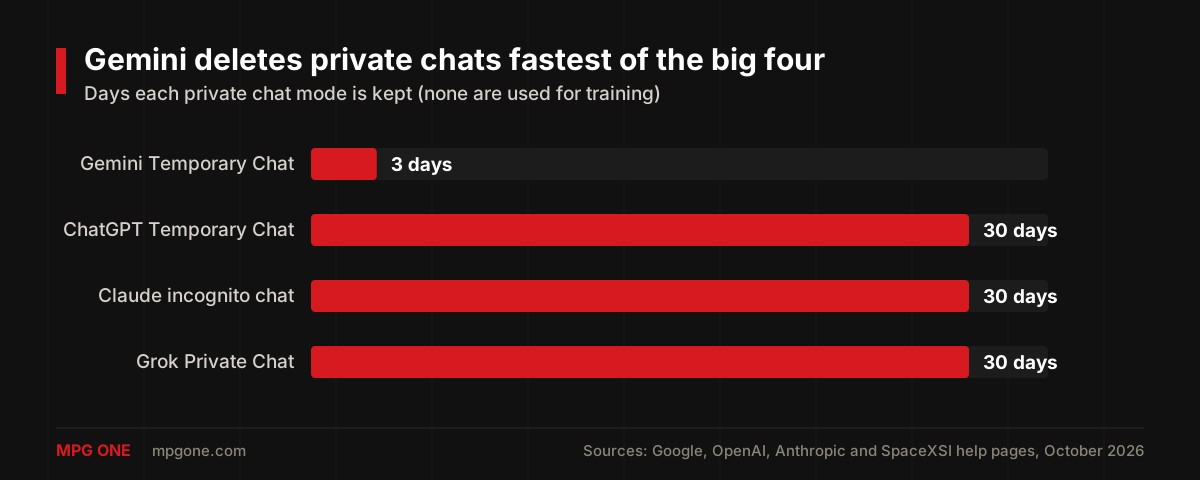
I left Microsoft Copilot out of the table. Microsoft's older Copilot FAQ says signed in consumer chats train its models unless you opt out, but the privacy controls page for the new Copilot app, live since August 18, 2026, lists no model training switch, so I couldn't confirm the current rule. For more on ChatGPT, including photos, see my post on whether ChatGPT saves your data.
FAQ
Does Gemini Pro train on your data?
Yes. A paid Google AI plan follows the same Gemini Apps rules as the free app: Google's Gemini Apps Privacy Hub ties training to the Keep Activity setting, not to your subscription. With Keep Activity on, your chats can train Gemini, and chats picked for human review are kept for up to 3 years.
Does the Gemini API train on your data?
Only on the free tier. Google's Gemini API terms say unpaid services such as Google AI Studio and the free quota are used to improve Google's products, with human reviewers, while paid services are not. In the EEA, Switzerland and the UK, the paid rules apply to every tier.
Does Gemini CLI train on your data?
It depends on how you log in. Google's Gemini CLI privacy page says a personal Google login and a free API key can be used for model training, while Gemini Code Assist Standard or Enterprise, a paid API key and Vertex AI are not. On a personal login, turning off Usage Statistics stops Google collecting your prompts and code for model improvement.
Does Gemini train on Gmail and Google Workspace data?
Not on the content itself. Work and school Workspace accounts fall under a training restriction that blocks training without your organization's permission, and Google told Ars Technica in April 2026 that personal Gmail and Drive content used by Gemini is not used to train its foundation models. On a personal account, Gemini's own chats, including summaries of your emails, can still be used for training while Keep Activity is on.
Is Gemini safe for confidential information?
Not on a personal account with Keep Activity on. Google's Gemini Apps privacy notice asks you not to enter confidential information you would not want a reviewer to see or Google to use to improve its services. For confidential work, use a Workspace business account, the paid API or a private AI setup.
Final Thoughts
Does Gemini train on your data? On a personal account, yes until you turn off Keep Activity, and any chat a reviewer has seen stays with Google for up to 3 years whatever you do later. On Workspace business and education accounts, the paid Gemini API and Google Cloud, no.
Use Temporary Chat for anything sensitive, and if your team uses Gemini for work, move it onto Workspace accounts instead of personal logins. If your company wants Gemini or another model running on its own data with its own retention rules, that is the kind of system we build through our AI development services.
Helpful next steps
Turn the idea into something useful
When this topic becomes part of a real website, workflow, campaign, or AI system, these MPG ONE pages are the natural places to continue.
Build private AI assistants, workflow automation, knowledge systems, and reporting layers.
Generative AI development servicesBuild generative AI workflows for content, documents, knowledge, and brand-safe operations.
Custom AI solutionsCreate a custom AI system around your data, tools, permissions, and operating model.
AI agent development servicesDesign tool-using AI agents with memory, retrieval, permissions, and human review.
MPG ONE coursesLearn practical AI systems, SEO growth workflows, and talent brand operations with MPG ONE training.