AI
AI Personal Assistant: What It Is and How to Pick One
AI personal assistant, explained: chatbots vs. action-taking agents, the best tools, real cost and adoption data, and how to set one up. Full guide.

By Mohamed Ezz CEO & Founder Jul 7, 2026
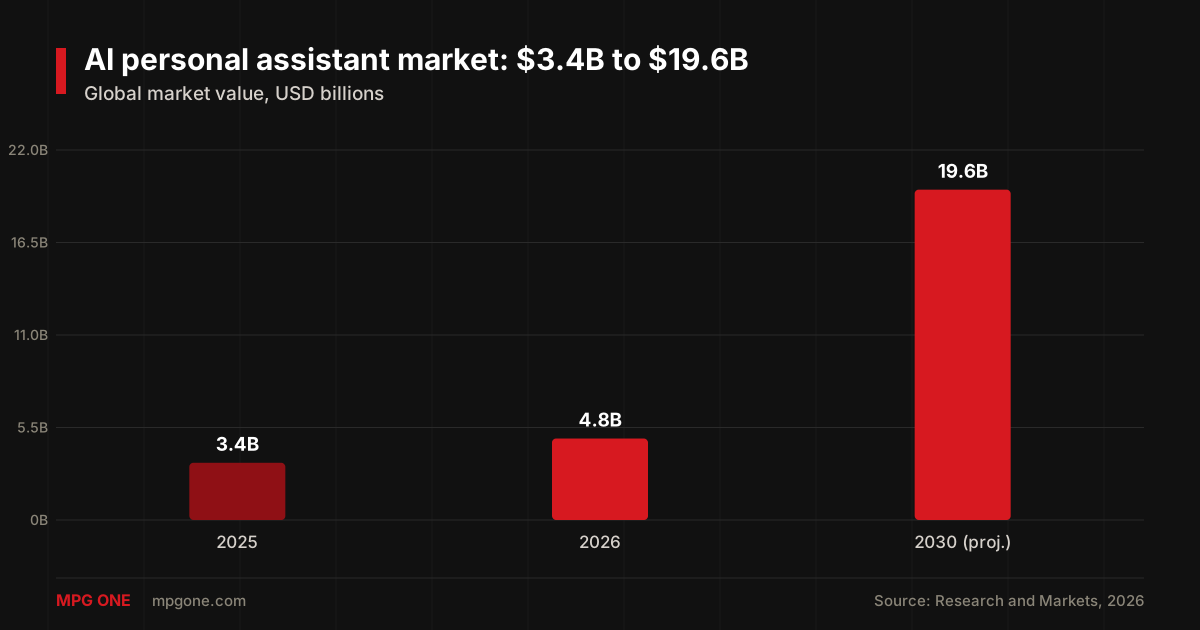
Here's a number that reframes the whole conversation: the AI personal assistant market is worth $4.84 billion in 2026 and is projected to hit $19.63 billion by 2030, according to Research and Markets. That's a 41.9% annual growth rate — the kind of curve you only see when a tool goes from novelty to habit.
The short answer up front: an AI personal assistant is software that uses AI to handle your day-to-day admin — email, scheduling, research, drafting, reminders — so you spend less time on the boring parts of work. But there's a catch most tool roundups skip, and it decides whether you'll actually get value: some "assistants" only talk, and some actually do the work. Get that distinction wrong and you'll pay for a chatbot that hands you homework instead of finishing it.
My Main Points:
- An AI personal assistant manages your admin — the real dividing line is whether it takes action or just generates text
- ChatGPT, Claude, and Gemini are chatbots; tools like Lindy and Reclaim are agents that act on your apps
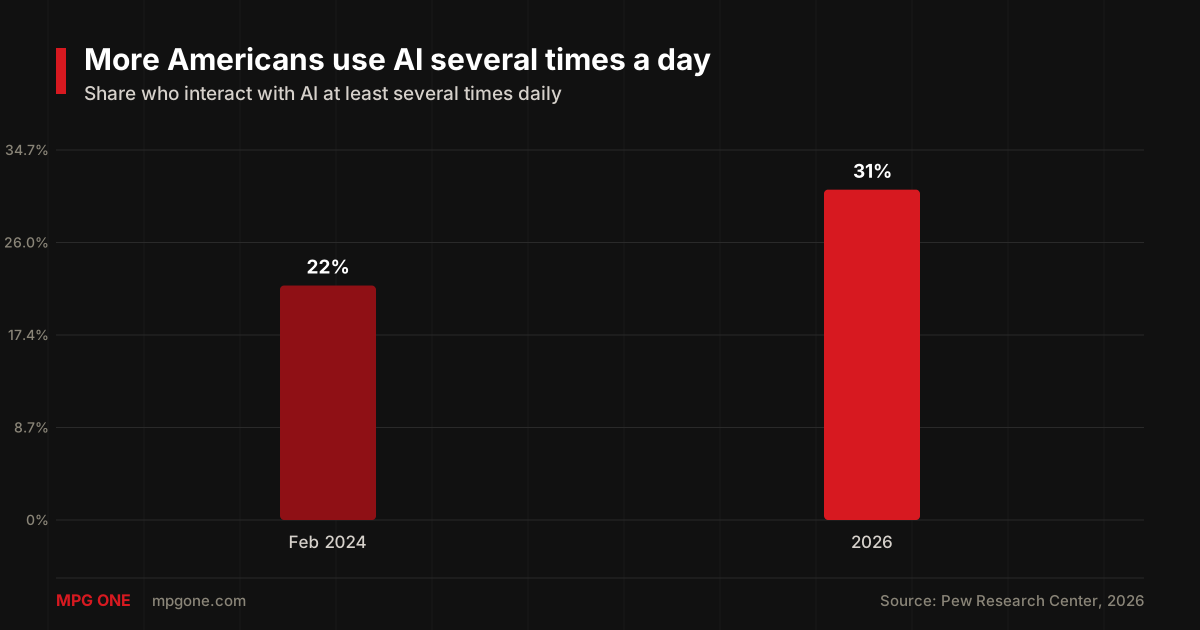
- Adoption is climbing fast — 31% of Americans now use AI several times a day, up from 22% in early 2024 (Pew)
- Off-the-shelf tools cost free to ~$49/mo; a custom assistant on your own data starts in the low thousands
- Before you connect your inbox, check the privacy tier — it matters more than the model
After nearly 20 years in AI development and digital marketing, I've watched "assistant" become one of the most oversold words in tech. In this guide I'll define what these tools really are, show you the chatbot-vs-agent split that decides everything, share the verified adoption data, compare the best options, and walk through setting one up. If you run a company rather than a personal calendar, read this alongside our guide to choosing an AI assistant for business — the decisions overlap.
What Is an AI Personal Assistant?
An AI personal assistant is a software tool that uses artificial intelligence — mostly large language models — to help you manage everyday tasks: writing and answering email, scheduling meetings, summarizing documents, doing research, setting reminders, and drafting content. Think of it as a capable junior assistant that works in text, available every hour of the day.
This is a different thing from the voice assistants you already know. Siri, Alexa, and Google Assistant were built to answer quick questions and control devices. A modern AI personal assistant is built for knowledge work — the writing, reasoning, planning, and summarizing that fills a real workday. The engine underneath is the same class of model that powers tools like Claude and Gemini, which is why the capability jump over old voice assistants is so large.
The market has split into three rough tiers: free general chatbots, paid specialist tools for one job (like scheduling), and custom assistants built on your own data. Which tier you need depends entirely on the next distinction.
Chatbots vs. True AI Assistants: The Difference That Matters
This is the part most "best AI assistant" lists gloss over, and it's the one that actually decides whether you get value. There are two very different things wearing the same label.
A chatbot generates text. You ask, it answers — it writes the email, explains the concept, drafts the plan. ChatGPT, Claude, Gemini, and Perplexity are all chatbots at their core, no matter how smart the underlying model is. They're brilliant, but they hand the output back to you and stop there.
A true AI assistant takes action. It reads your actual inbox, drafts the reply in your voice, books the meeting on your real calendar, and updates the document — producing outcomes, not suggestions. Tools like Lindy, alfred_, and Reclaim live in this camp. The line between "gives me a draft" and "sends the thing" is the whole ballgame.
| Feature | Chatbot (ChatGPT, Claude, Gemini) | Action-taking agent (Lindy, Reclaim) |
|---|---|---|
| Writes and reasons | Yes — best in class | Yes, usually via the same models |
| Reads your real inbox/calendar | Only when connected to tools | Yes, by design |
| Takes action for you | No, hands output back | Yes — sends, books, updates |
| Persistent memory | Improving, tool-dependent | Core feature |
| Best for | Drafting, analysis, research | Running email, scheduling, follow-ups |
Why does this matter in 2026 specifically? Because persistent memory and cross-app action have gone from premium features to baseline expectations. A year ago, an assistant that remembered your preferences was a differentiator. Now it's close to table stakes — which means the tools that only chat feel increasingly thin next to the ones that finish the job.
How Fast Adoption Is Growing
The growth isn't hype — it shows up in independent data. On the market side, the personal AI assistant category is projected to nearly quadruple in five years, from $3.4 billion in 2025 to $19.63 billion by 2030, per Research and Markets.
Money follows behavior, and the behavior is shifting just as fast. The Pew Research Center found that 31% of Americans now say they interact with AI at least several times a day, up from 22% in February 2024. Over the same stretch, the share of U.S. workers doing at least some of their job with AI rose from 16% in 2024 to 21% in September 2025.
Put the two together and the story is clear: daily use is becoming normal, and spending is racing to catch up. That's exactly the moment to pick a tool deliberately rather than defaulting to whatever's loudest.
The Best AI Personal Assistants Right Now
There's no single best AI personal assistant — there's a best one per job. Here's how the strongest options in 2026 break down by what they're actually good at, with current pricing.
| Tool | Type | Best for | Price (2026) |
|---|---|---|---|
| ChatGPT | Chatbot | General reasoning, writing, voice | Free–$20/mo |
| Claude | Chatbot | Long documents, coding, careful writing | Free–$20/mo |
| Google Gemini | Chatbot | Google Workspace (Gmail, Docs, Calendar) | Free–$19.99/mo |
| Perplexity | Chatbot | Real-time research with citations | Free–$20/mo |
| Lindy | Agent | Running email, scheduling, follow-ups | From ~$30/mo |
| Reclaim | Agent | Calendar and focus-time management | Free–$12/seat/mo |
| Motion | Agent | AI project scheduling | ~$49/mo |
Pricing and plans are current as of July 2026 and drawn from each tool's roundup coverage on Zapier and Otter; check the vendor's own page before you buy, since AI pricing moves quickly.
My honest read: if you mostly need help thinking and writing, a single chatbot subscription covers it — ChatGPT for range, Claude for long or careful work. If your pain is time and coordination, pair it with one agent like Reclaim or Lindy. Most people are best served by a boring combination that works, not the flashiest model on the market.
Off-the-Shelf vs. Custom-Built: When Generic Isn't Enough
The tools above are consumer apps, and for personal admin they're plenty. But they hit a wall the moment your needs get specific: you want the assistant to know your company's data, follow your exact process, or keep information out of a public model. That's where off-the-shelf stops and custom-built begins.
A custom AI personal assistant is one built on your own data and rules — connected to your documents, your systems, and your definitions of "done." It can be given real memory of your context and can act inside infrastructure you control. If you want to understand the engineering side, our walkthrough on building AI agents with memory shows how the persistent-context piece actually works.
The trade-off is straightforward. Off-the-shelf tools are cheap, instant, and generic. Custom assistants cost more up front — typically low thousands to build, plus model usage — but they fit your work exactly and keep your data private. For sensitive workflows, that privacy gap is the deciding factor, which is why it's worth understanding what private AI is before you route anything confidential through a consumer app.
How to Set Up Your First AI Personal Assistant
You don't need a big rollout. The fastest path to value is small and specific.
- Pick one task. Choose the single workflow that eats the most time — inbox triage, scheduling, or research. One task, not ten.
- Match the tool to the task. Drafting and thinking → a chatbot. Doing and coordinating → an agent. Use the table above.
- Connect it narrowly. Give it access to just what that one task needs. Don't hand over your whole digital life on day one.
- Check its work for a week. Review every output before you trust it to run unattended. This is how you learn where it's strong and where it drifts.
- Add the second task. Once you trust the first workflow, expand. Compounding one reliable habit beats ten shaky ones.
The people who get the most out of these tools treat them like a new hire: one clear job first, trust earned before responsibility grows.
Privacy and Trust: What to Check First
Before you connect an assistant to your inbox or files, check three things. First, the plan tier: business and enterprise plans of the major tools contractually exclude your data from model training, while free consumer tiers often don't. Second, what it can access — grant the minimum, not everything. Third, where your data lives once the assistant touches it.
The simple rule I give clients: never route sensitive personal or company data through a free consumer account. If the information matters, use a paid business tier with training turned off, or a custom private assistant on infrastructure you control. The convenience of an assistant is never worth leaking the data you handed it.
FAQ
How do I use AI as a personal assistant?
Start with one task that eats your time — email triage, scheduling, or research. Connect a tool like ChatGPT, Gemini, or an action-taking agent to that single workflow, check its output for a week, then add a second task once you trust it.
Can I make my own personal AI assistant?
Yes. You can build one on top of a model API with a simple agent loop plus memory, or use no-code builders. For anything touching private data, a custom-built assistant on infrastructure you control is safer than a consumer app.
What is the difference between an AI assistant and a chatbot?
A chatbot generates text — it answers, writes, and explains. A true AI assistant takes action: it reads your inbox, books the meeting, and updates the doc. In 2026 that line is the single most important thing to check before you pay for one.
Is ChatGPT an AI personal assistant?
ChatGPT is a chatbot with growing assistant features. On its own it reasons and writes brilliantly, but it only takes real action across your apps when you connect it to agents or automation. For conversation and drafting, it's still the most capable starting point.
How much does an AI personal assistant cost?
Consumer tools run free to about $20-$30 per month. Specialized scheduling and email agents cost roughly $12-$49 per month. A custom assistant built on your own data starts around a few thousand dollars to build, plus ongoing model usage.
Final Thoughts
An AI personal assistant is one of the highest-leverage tools you can adopt right now — but only if you buy the right kind. Remember the split: chatbots think and write, agents take action, and the gap between them decides whether you get help or homework. Start with one task, match the tool to it, check the privacy tier, and expand only once you trust it.
Consumer tools handle personal admin well. When you need an assistant that knows your data, follows your process, and keeps everything private, that's a custom build — and it's exactly what we do. If you're ready to move past off-the-shelf, take a look at our AI agent development services and we'll help you scope an assistant that actually fits how you work.
Helpful next steps
Turn the idea into something useful
When this topic becomes part of a real website, workflow, campaign, or AI system, these MPG ONE pages are the natural places to continue.
Build private AI assistants, workflow automation, knowledge systems, and reporting layers.
AI agent development servicesDesign tool-using AI agents with memory, retrieval, permissions, and human review.
Generative AI development servicesBuild generative AI workflows for content, documents, knowledge, and brand-safe operations.
Custom AI solutionsCreate a custom AI system around your data, tools, permissions, and operating model.
MPG ONE coursesLearn practical AI systems, SEO growth workflows, and talent brand operations with MPG ONE training.