AI
AI Assistant for Business: How to Choose the Right One
AI assistant for business, explained: the 5 types, what they cost, real adoption data, and how to choose one that fits your workflow. Full guide.

By Mohamed Ezz CEO & Founder Jul 3, 2026
An AI assistant for business is no longer an experiment — 82% of small business employers have already invested in AI tools, according to the SBE Council's 2026 Tech Use Survey, and the typical small business now runs five of them. The question has moved from "should we use one?" to "which one, for what, and how do we not waste money?"
The short answer up front: choose the assistant by the task, not by the brand. A business AI assistant is any AI tool that takes real work off a person's plate — writing, scheduling, customer questions, sales follow-up, or internal answers. The five types below cover the whole market, and the right choice comes down to three things: the job, your data rules, and your budget.
My Main Points:
- There are five types of business AI assistants — most companies need two or three, not one do-everything tool
- Adoption numbers vary wildly by definition: from 8.8% (strict government measure) to 82% (any AI tool) — both are true
- Businesses that adopt report real results: 91% say AI boosted revenue in Salesforce's SMB survey
- Start from one painful task and choose the lightest tool that fixes it
- If the assistant touches customer or company data, the plan tier matters more than the model
In this guide, I'll break down the five types of business AI assistants with real costs, show you what the adoption and results data actually says, and give you the decision framework we use with clients. If your main concern is keeping company data out of public models, read this together with our guide to what private AI is — the two decisions go hand in hand.
What Counts as an AI Assistant for Business?
The label gets slapped on everything, so let's be precise. An AI assistant for business is software that uses a language model to complete or support work tasks — not just answer trivia. That covers a general chatbot your team uses for drafting, a scheduling agent that books your meetings, and a custom assistant that answers questions from your company's own documents.
After nearly 20 years in AI development and marketing, my working test is simple: does it remove a task from a human's week, reliably, without creating a new checking task that takes just as long? If yes, it's earning its seat. If it produces drafts nobody trusts or answers nobody verifies, it's a toy.
What the Adoption Numbers Really Say
You've probably seen wildly different adoption statistics. They're all real — they just measure different things. The SBE Council found 82% of small business employers have invested in some AI tool. The U.S. Chamber of Commerce reported 58% were using generative AI in 2025, up from 40% the year before. And the U.S. Census Bureau's strict measure — AI used in the actual production of goods and services — sat at just 8.8%.
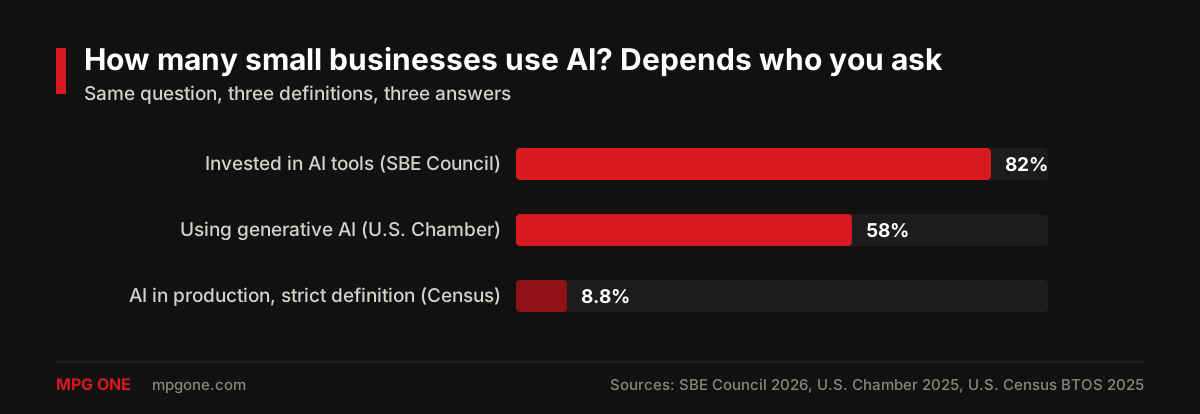
The honest reading: most businesses have touched AI tools, a majority now use them regularly, and a small core has wired them deep into operations. That last group is where the competitive gap is opening — 93% of AI-using businesses in the SBE survey plan to keep investing.
What Businesses Actually Get From It
The results data is more useful than the adoption data. In Salesforce's SMB Trends research, 91% of small businesses using AI said it boosted their revenue and 90% said it made operations more efficient. The U.S. Chamber found 73% credit AI with improving their competitiveness, and SMB Group's research found 58% of small business AI users save more than 20 hours per month.
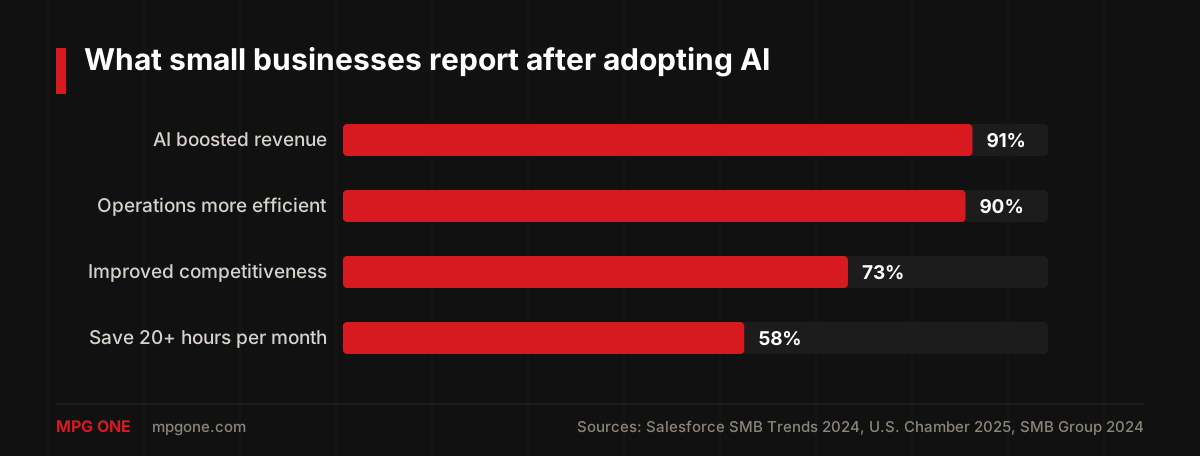
Two caveats I always give clients. First, these are surveys of adopters — businesses that stuck with AI long enough to answer a survey about it. Second, the gains concentrate where the assistant matches a real workflow. Twenty hours a month is very achievable on document-heavy or inbox-heavy work; it is not achievable by giving everyone a chatbot login and hoping.
The 5 Types of Business AI Assistants
Every product on the market falls into one of five buckets:
| Type | Examples | Best for | Typical cost |
|---|---|---|---|
| General assistants | ChatGPT, Claude, Gemini | Writing, analysis, research, coding | $20-$30/user/mo |
| Meeting & admin | Motion, Reclaim, Fireflies | Scheduling, notes, follow-ups | $10-$30/user/mo |
| Customer service | Intercom Fin, Zendesk AI | Support triage, instant answers | $50-$300/mo + per-resolution fees |
| Sales & marketing | HubSpot AI, Lindy, Clay | Lead research, outreach, CRM updates | $50-$500/mo |
| Custom & private | Built on your data and rules | Internal knowledge, regulated data, unique workflows | From a few $1,000s to build + usage |
Most businesses end up with a stack: a general assistant on a business plan for everyone, one or two specialized tools where the pain is worst, and — once AI proves itself — a custom assistant for the workflows no off-the-shelf product handles. That last step is what we build at MPG ONE, and it's also where AI agents come in when the job needs multiple steps and tools.
How to Choose: Task First, Tool Second
The framework I use with every client, in order:
- Name the task. Not "we need AI" — a specific workflow that eats hours. "Support email takes 15 hours a week" is a task. Pick one.
- Write down the data it touches. Customer records? Contracts? Public info only? This decides your options faster than any feature list, because it sets the privacy bar.
- Check the plan tier, not just the tool. Business tiers of the big assistants don't train on your data by contract; consumer accounts may. We've covered the details for ChatGPT Enterprise and it's the same pattern across vendors.
- Choose the lightest option that clears the bar. A $25/month tool that solves the task beats a custom build; a custom build beats forcing sensitive data through a tool that wasn't designed for it.
- Measure for 30 days. Hours saved, quality, and whether people actually use it. Kill it or scale it — don't let it linger.
Off-the-Shelf vs Custom-Built
Off-the-shelf assistants win on speed and price, and for most generic tasks they're the right call. A custom assistant wins in three situations:
- Your answers live in your own documents. Policies, price lists, product specs, past proposals — a general assistant doesn't know them. A custom assistant grounded in your data answers from them, with role-based permissions.
- Your data can't leave your boundary. Regulated industries and confidential workflows need the deployment options we covered in the private AI guide — private cloud, zero-retention agreements, or self-hosting.
- The workflow is your edge. If the process is what makes you better than competitors, an off-the-shelf tool levels you back down to everyone else's workflow.
Cost reality: a focused custom assistant is a few-thousand-dollar build, not a moonshot — the expensive failures are the ones that start with a platform instead of a task. Our AI development services page shows how we scope these.
A Rollout That Actually Works
The pattern behind every successful deployment I've seen:
- Start with one team and one task, with a named owner who wants it to work.
- Move everyone off personal accounts onto a governed business plan on day one — this is a data-leak fix, not a productivity feature.
- Write three example prompts or flows for the task, so people copy working patterns instead of improvising.
- Review outputs weekly for the first month. Quality problems show up early and are fixable with better grounding or instructions.
- Expand only after the first task pays for itself. The 20-hours-a-month statistic comes from focused deployments, not big-bang rollouts.
FAQ
What is the best AI assistant for business?
There is no single best one — there is a best one per job. General assistants like ChatGPT and Claude win for writing and analysis, scheduling tools like Motion or Reclaim win for calendars, and customer-facing or internal-knowledge work usually needs a purpose-built or custom assistant connected to your own data.
How much does an AI assistant for business cost?
Off-the-shelf assistants run roughly $20-$30 per user per month on business plans. Purpose-built sales or support tools typically cost $50-$500 per month. Custom assistants built on your own data start around a few thousand dollars to build, plus ongoing model usage.
How do I choose an AI assistant for my business?
Start from one task, not from a tool: pick the workflow that eats the most hours, write down the data the assistant would touch, check your privacy requirements, then choose the lightest option that handles it. Measure results for 30 days before expanding.
Can an AI assistant keep my business data private?
Yes, if you pick the right tier. Business and enterprise plans of major assistants contractually exclude your data from training, and custom private assistants keep everything inside infrastructure you control. The one rule with no exceptions: never run business data through personal accounts.
Final Thoughts
The AI assistant decision is really three small decisions: which task, which data rules, which tier. Get those right and even a $25/month tool delivers the results the surveys describe. Get them wrong and you join the businesses quietly paying for five tools nobody uses.
And if your best workflow needs an assistant that knows your business — your documents, your rules, your permissions — that's a build, not a subscription. That's exactly what we do at MPG ONE: take a look at our custom AI solutions and tell us which task you want off your team's plate first.
Helpful next steps
Turn the idea into something useful
When this topic becomes part of a real website, workflow, campaign, or AI system, these MPG ONE pages are the natural places to continue.
Build private AI assistants, workflow automation, knowledge systems, and reporting layers.
Generative AI development servicesBuild generative AI workflows for content, documents, knowledge, and brand-safe operations.
Custom AI solutionsCreate a custom AI system around your data, tools, permissions, and operating model.
AI agent development servicesDesign tool-using AI agents with memory, retrieval, permissions, and human review.
MPG ONE coursesLearn practical AI systems, SEO growth workflows, and talent brand operations with MPG ONE training.